
What Broadband Speed Do I Need for IPTV?
Work out your IPTV connection needs from stream requirements, active screens and other household use, then assess the shared connection and each viewing device separately.
On this page
“What broadband speed do I need for IPTV?” Start with the documented requirement for your chosen stream, add other activity happening at the same time, then assess the shared connection and each viewing device separately. A package’s advertised speed is only part of the answer. The seven checks below help you identify missing information and decide whether to investigate the local connection or discuss a different plan.
Broadband speeds are usually expressed in megabits per second, or Mbps. Download software may instead show megabytes per second, or MB/s. Eight bits make one byte, so 8 MB/s equals 64 Mbps before considering what each measurement includes.
Keep three figures separate: the package’s stated broadband speed, the local connection’s negotiated link rate, and a test’s measured download throughput. None automatically tells you the capacity available to a particular programme. Check how your provider defines the package figure and where any stated performance commitment applies.
For anyone comparing broadband speed for IPTV, “what broadband speed do I need for IPTV?” is a planning question. Keep the stream requirement, household estimate and measured evidence in separate notes. The household total must fit the shared connection; each television also needs a suitable local connection for its own stream. A speed test on one television is not a measurement of capacity available to every device at once.
What broadband speed do I need for IPTV? Start with the stream
A stream’s bitrate describes the rate of data used to carry its video and audio. A recommended connection speed is guidance about the connection needed to receive it. Those figures need not match: a recommendation may already include room for variation or delivery overhead.
If you ask “what broadband speed do I need for IPTV?” using only a resolution label, an important detail is missing. Resolution describes picture dimensions, not a fixed data rate. Codec, compression settings, frame rate and content can change the bitrate of streams with the same resolution.
For context, YouTube’s published playback guidance gives these approximate sustained-speed recommendations for its own playback:
| Video resolution | YouTube reference recommendation |
|---|---|
| HD 720p | 2.5 Mbps |
| HD 1080p | 5 Mbps |
| 4K UHD | 20 Mbps |
These are YouTube reference examples, not certified requirements for IPTV Ireland Fast or every IPTV stream. Use your actual service’s documentation for planning. Do not assume another service’s 4K version has the same requirements.
A useful answer to “what broadband speed do I need for IPTV?” therefore begins with an identified stream and a clearly described requirement. If the service gives a recommended connection figure, ask whether it applies to one stream and whether it already includes an allowance. Our introduction to IPTV explains why the content service, player and device are different parts of the setup. If only an average bitrate is available, ask how much it varies.
7 Essential Checks for Choosing Broadband Speed for IPTV
Use these checks to turn “what broadband speed do I need for IPTV?” into a record you can discuss with support. Note the requirement, the measurement point and what remains unknown. Keep a quiet baseline separate from normal household viewing, and change only one test condition at a time.
1. Find the requirements for the stream you actually watch
Identify the service, quality option and viewing device. Look for documented requirements covering that combination rather than a generic headline about IPTV internet speed. If the information is absent, request it before selecting a broadband package around an assumed figure.
Your question can be specific: “What broadband speed do I need for IPTV at this quality on this device, and is your figure a bitrate or a connection recommendation?” Also ask whether the stream uses a fixed rate or changes with content or connection conditions.
Record what the answer covers. A requirement for one stream is not a household total, and guidance for one quality option may not cover another. Where no reliable requirement is available, mark it as unknown. A plausible-looking number is still an assumption until the service confirms it.
If different quality options are available, ask “what broadband speed do I need for IPTV at each option?” Record those answers separately so you can compare a lower-demand arrangement without assuming the same requirement applies.
2. Count simultaneous streams permitted by the subscription
Count the screens that will actually play at the same time. Two televisions used at different times do not create the same viewing demand as two playing together. Include another active viewing device if it genuinely overlaps with the main television.
“What broadband speed do I need for IPTV on two screens?” has two separate parts: capacity for both streams, and permission to run both sessions. Check your order’s allowance or the relevant subscription options. Additional broadband capacity does not authorise additional service sessions.
Add the expected demand of each active stream, accounting for different quality options. Do not automatically multiply a whole-house recommendation by the screen count. First establish whether the supplied figure describes one stream, several streams or a complete household connection.
3. Add realistic competing household activity
List activity likely to overlap with viewing: another video service, a large file transfer, a video call or a game download. Focus on active transfers rather than counting every connected gadget as equally demanding. An idle tablet and a downloading laptop represent different situations.
For “what broadband speed do I need for IPTV in a busy home?”, model a recognisable evening rather than every possible device running at maximum demand. Ask household members what normally overlaps and identify optional transfers that can be scheduled elsewhere.
Download capacity matters for receiving television. Uploads from backups, calls or other activity can also affect household conditions, so record them separately. A viewer does not need upload capacity equal to the bitrate used by the broadcaster’s encoder.
Keep estimates in the same units and distinguish upload from download. When answering “what broadband speed do I need for IPTV?”, do not add an upload requirement directly to a download total and call the result a required download speed.
4. Measure the shared connection and each viewing-device path
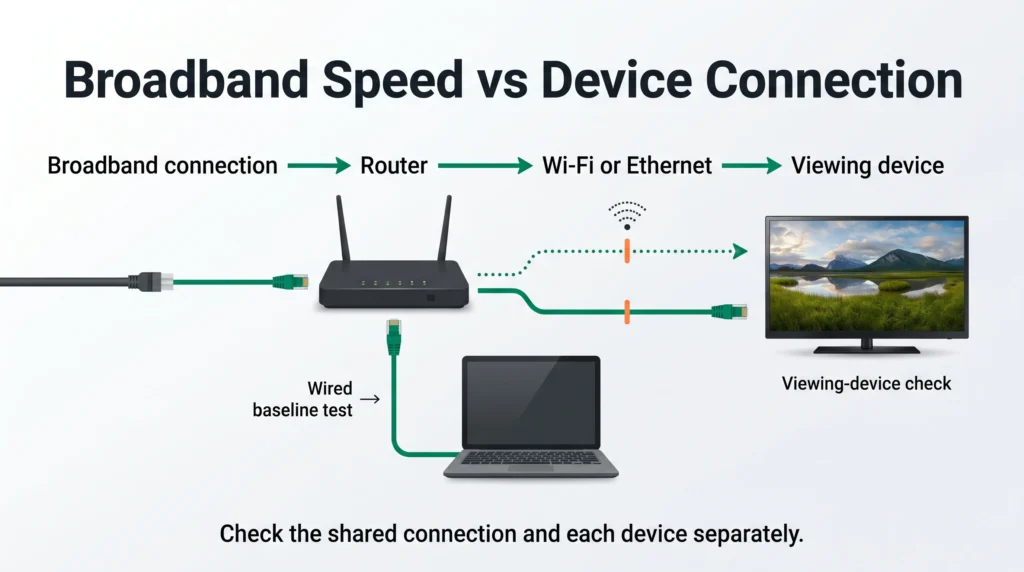
Use a supported connection test on the actual viewing device where available. Record the device, test method, connection type and time. A phone test beside the sofa is supplementary evidence; it does not measure the television’s wireless hardware or software.
Separately, use a supported wired test device connected to the router to establish a baseline. Check that its port, adapter and cable support the speed being assessed. Pause optional transfers you control for this baseline, record anything left active, and avoid interrupting essential household services. ComReg’s home broadband guidance recommends wired speed comparisons against the package and explains how local Wi-Fi conditions can affect results.
The practical question becomes: “What broadband speed do I need for IPTV, and how much of my present connection reaches the screen?” A stronger wired baseline alongside weaker viewing-device results makes the local connection or device worth investigating before buying more broadband.
Do not run a capacity-consuming speed test alongside playback and treat the interruption as normal viewing performance. Record whether the test replaced the stream or ran with other demand. A test reaches its own endpoint; it does not examine every route used by the content service.
5. Repeat during the intended viewing period
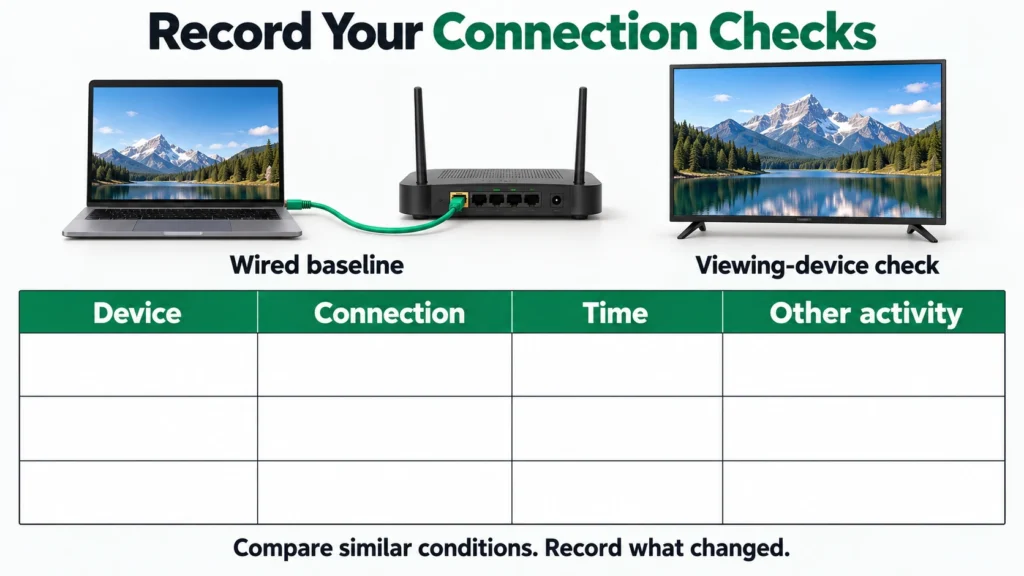
Separate a quiet baseline from a representative household comparison. For the baseline, pause optional transfers you control and record what remains active. For the household comparison, record normal overlapping use. Repeat at times you would normally watch rather than relying solely on a quiet morning.
“What broadband speed do I need for IPTV in the evening?” is better answered with repeated observations under relevant conditions. Keep the device and test method consistent, and note unusual activity. Avoid comparing an empty-house wired result with a busy-household phone test as though only the time changed.
Look at the pattern and variation, not just the highest reading. Throughput measures delivered data over time; consistency concerns whether delivery remains adequate throughout use. Latency, jitter and packet loss can help a support investigation, but there is no universal IPTV pass mark to invent here.
Keep a short record you can explain: when you tested, how you connected, what else was active and whether playback was affected separately. This makes the answer to “what broadband speed do I need for IPTV?” more useful than a single impressive number.
6. Check local Wi-Fi, Ethernet and hardware limitations
Review the route from router to television briefly. Microsoft’s guidance on Wi-Fi and home layout explains band, range and obstruction trade-offs and recommends recording comparisons around the home. Faster-capable bands are not automatically better through every wall; both router and device must support the arrangement.
Before asking “what broadband speed do I need for IPTV on a faster plan?”, check whether your current local connection can use the capacity already available. A supported Ethernet comparison can help isolate the wireless link, but adapter and port compatibility depend on the exact device.
A network port’s capability and the device’s video-decoding ability are separate limits. A 100 Mbps port does not automatically prevent one 4K stream: compare the actual stream demand with usable throughput. Equally, a fast connection cannot supply missing codec support or guarantee smooth decoding.
Check the exact device’s official specifications and compatibility information before purchasing equipment. When considering “what broadband speed do I need for IPTV?”, record hardware constraints alongside connection results so that a broadband upgrade is not used to address an unrelated device limitation.
7. Compare household demand and per-device needs separately
Bring together the stream guidance, permitted simultaneous viewing, expected household activity and repeated measurements. First compare total expected household download demand with the shared connection, using supported wired baseline observations and the package terms as evidence. Then consider whether each viewing device can sustain its own stream. Keep upload activity separate from the download total.
Ask: “What broadband speed do I need for IPTV beyond what I already receive?” If the shared connection can accommodate expected simultaneous use and each screen has adequate local capacity for its stream, a larger package may not address the problem. Investigate the source, player or local setup as appropriate. A fast result on one screen alone does not establish spare capacity for the whole home.
If repeated supported wired results are unexpectedly low against your package’s stated terms, ask broadband support to investigate before assuming a more expensive plan is necessary. If the existing service operates as described but cannot accommodate your normal shared demand, a different plan may be worth comparing.
Leave room above expected demand for variation, without inventing a universal percentage. The answer to “what broadband speed do I need for IPTV?” should include what remains uncertain, which constraint an upgrade would address and whether the local device can benefit from it.
What broadband speed do I need for IPTV? Two worked examples
The following examples are hypothetical calculations using assumed inputs. They are not measurements, service requirements or recommended package tiers. They demonstrate how to organise the question “what broadband speed do I need for IPTV?” without disguising assumptions as evidence.
A single screen with light overlapping use
Assume one chosen stream averages 8 Mbps and another activity uses 2 Mbps of download capacity at the same time. The modelled total is 8 + 2 = 10 Mbps, before considering variation and delivery overhead.
This does not establish that a nominal 10 Mbps package is sufficient. Both inputs are assumptions, the stream may peak above its average, and measured throughput may fluctuate. Capacity equal to the modelled average leaves no room in this example. The 10 Mbps model belongs to the shared connection; the television’s own path must accommodate its assumed 8 Mbps stream. A measurement taken while other traffic is running also reflects that competition.
To answer “what broadband speed do I need for IPTV?” for this household, replace those assumptions with documented stream guidance and relevant observations. If the service supplies a connection recommendation that already includes allowance, do not add that same allowance again.
Two screens and a competing activity
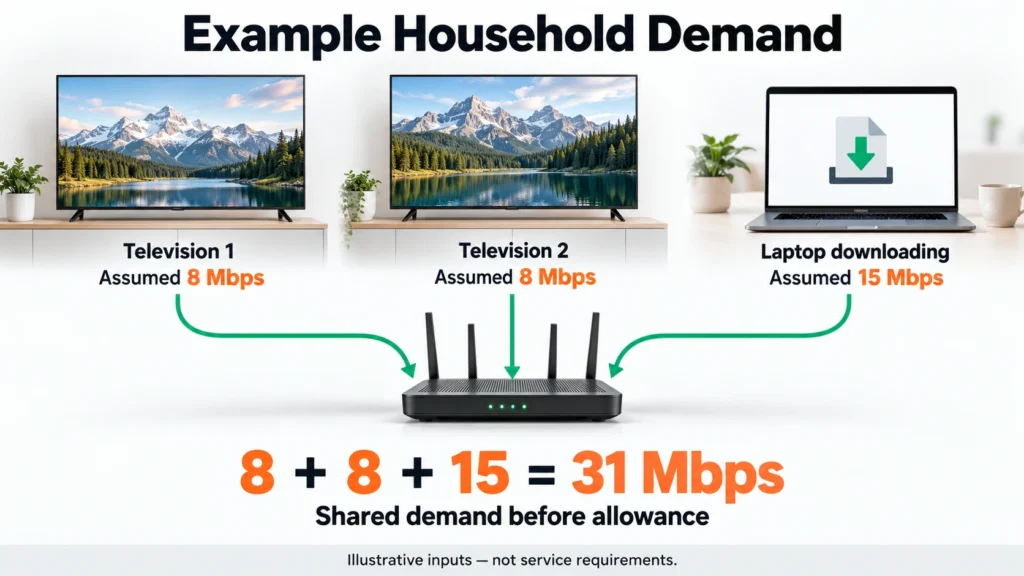
Now assume the subscription permits two streams, each modelled at 8 Mbps, while another download activity uses 15 Mbps. The model is:
| Hypothetical activity | Assumed download demand |
|---|---|
| Screen 1 | 8 Mbps |
| Screen 2 | 8 Mbps |
| Other activity | 15 Mbps |
| Total before allowance | 31 Mbps |
The arithmetic is 8 + 8 + 15 = 31 Mbps across the shared broadband connection. Each screen separately needs a local path suitable for its assumed 8 Mbps stream. Do not demand 31 Mbps at each television or add separate device-test results as though they establish aggregate household capacity. That figure describes these example inputs only. It does not establish that every two-screen household needs the same package or that every download remains at 15 Mbps.
“What broadband speed do I need for IPTV when this download finishes?” would have a different model: the two assumed streams total 16 Mbps before allowance. Scheduling an optional transfer can change simultaneous demand, although it does not resolve every playback problem.
For “what broadband speed do I need for IPTV on both screens?”, check two constraints: room for the total demand on the shared connection, and suitable delivery to each screen during simultaneous use. Room above anticipated demand helps accommodate variation, but the appropriate allowance depends on what the inputs represent. Uncertain averages need different treatment from a service’s already-padded connection recommendation. Do not apply a standard percentage simply to create an apparently precise package recommendation.
Why a fast package can still feel slow at the television
A fast package describes one part of a longer delivery chain. The local connection, device, player and content source still matter. A successful test cannot prove that the programme’s source is healthy or that every connection along its delivery path behaves identically.
If you ask “what broadband speed do I need for IPTV?” after a playback failure, check whether the symptom is even a capacity problem. Repeated loading, a disconnected session, uneven motion and missing audio do not necessarily have the same cause.
Compare the demand evidence with the viewing-device observations. Consistently adequate capacity suggests broadening the investigation rather than automatically buying more Mbps. Low local results alongside a stronger wired baseline suggest examining the home connection first. Neither observation proves a single diagnosis.
Our buffering troubleshooting guide explains how to compare the connection, player, device and affected streams. Keeping these separate makes it easier to ask the right support team a useful question.
What broadband speed do I need for IPTV on a mobile plan?
Fibre, fixed wireless and mobile connections vary by location, package and installation. Avoid deciding suitability from the technology label alone. Check the exact address, current terms, realistic performance information and any data restrictions with the provider.
For local research, ComReg’s Broadband Checker provides a starting point. Confirm availability and the offered service directly for your address; a coverage enquiry is not a measurement of performance at your television.
For mobile or capped plans, “what broadband speed do I need for IPTV?” must be considered alongside “how much data might I use?” Speed is a rate; data allowance is an amount. A connection can be fast enough for a stream while having an unsuitable allowance for long viewing sessions.
An idealised constant 1 Mbps for one hour carries about 0.45 decimal GB: 1 × 3,600 ÷ 8 ÷ 1,000. An assumed constant 8 Mbps for two hours therefore carries about 7.2 GB of payload.
These calculations exclude overhead and assume a constant bitrate. Actual usage can vary with quality changes, viewing duration and other traffic. Compare any estimate with the plan’s terms and observed usage rather than treating it as an exact player reading.
When asking “what broadband speed do I need for IPTV on mobile broadband?”, also consider the cost of testing and viewing against the allowance. Obtain address-specific information before committing; no speed label supplies a universal answer.
Frequently asked questions
Is 25 Mbps enough for IPTV?
It may accommodate some viewing arrangements, but the package label alone is insufficient. “What broadband speed do I need for IPTV?” still requires documented stream demand, simultaneous activity and actual sustained capacity. The hypothetical 31 Mbps household above would exceed 25 Mbps of shared capacity before any allowance, even if each television can individually receive its own 8 Mbps stream.
Does 4K always need the same speed?
No. Internet speed for 4K IPTV depends on the actual stream and service guidance. Codec, frame rate and compression can produce different requirements at the same resolution. The table above is explicitly a reference for another platform’s own playback.
Does Ethernet mean I can buy a slower plan?
Ethernet may improve the local connection, but it does not reduce the stream’s underlying demand. When asking “what broadband speed do I need for IPTV with Ethernet?”, use the same household-demand model and compare it with the newly observed usable capacity.
Do two TVs need twice the speed?
Two similar streams received through separate unicast sessions add separate demand, even when both screens show the same programme. They approximately double the viewing component, not the whole household total. Multicast or local redistribution is a different setup and should not be assumed. Confirm the subscription allowance separately from broadband capacity.
Why does a phone test differ from the television?
Devices can use different wireless hardware, bands, locations and test endpoints. A phone may also use mobile data. For “what broadband speed do I need for IPTV on this television?”, prioritise supported viewing-device evidence, supplemented by a documented wired baseline.
Will a faster plan fix buffering?
Only if the constraint it addresses is relevant. More capacity cannot guarantee a healthy source, compatible player or reliable local link. Compare evidence first, and give support the device, time, connection type and household conditions rather than a presumed diagnosis.
Your next step
Before deciding “what broadband speed do I need for IPTV?”, write down three items: the documented per-stream requirement, expected simultaneous household demand and the connection evidence from comparable conditions. If one is missing, fill that gap before treating a package tier as the answer.
Replace unknown stream requirements with documented information, then compare expected simultaneous demand with the shared connection and each screen’s needs with its local performance. If “what broadband speed do I need for IPTV?” remains unanswered because stream details are missing, ask support for the relevant requirements.
If the uncertainty concerns broadband delivery, take your wired and viewing-device records to broadband support. Choose an upgrade only when you can identify the capacity problem it is intended to address.