
Can I Use IPTV on Multiple Devices? 7 Essential Checks
Understand the difference between installing a player on several devices and watching at the same time, with practical checks for your plan, apps and connection.
On this page
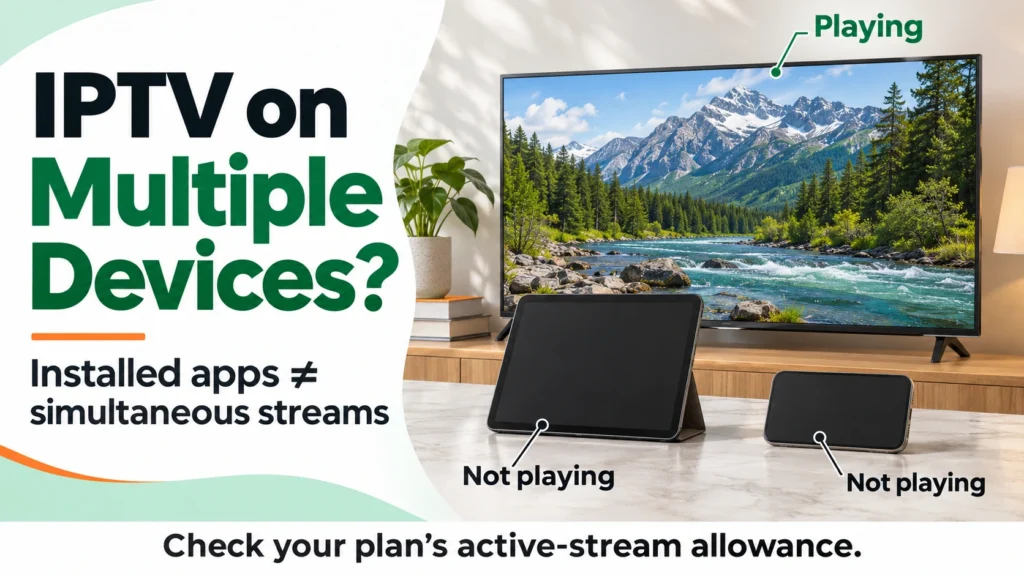
Can I use IPTV on multiple devices? Yes, where your service, players and devices support and permit it. Installing an app on several screens and watching simultaneously are different permissions. Check your selected allowance, player licences and connections before adding playback. Shared Wi-Fi, an extra installation or another paid app licence does not automatically increase the number of streams your subscription permits.
Can I use IPTV on multiple devices if only one is playing?
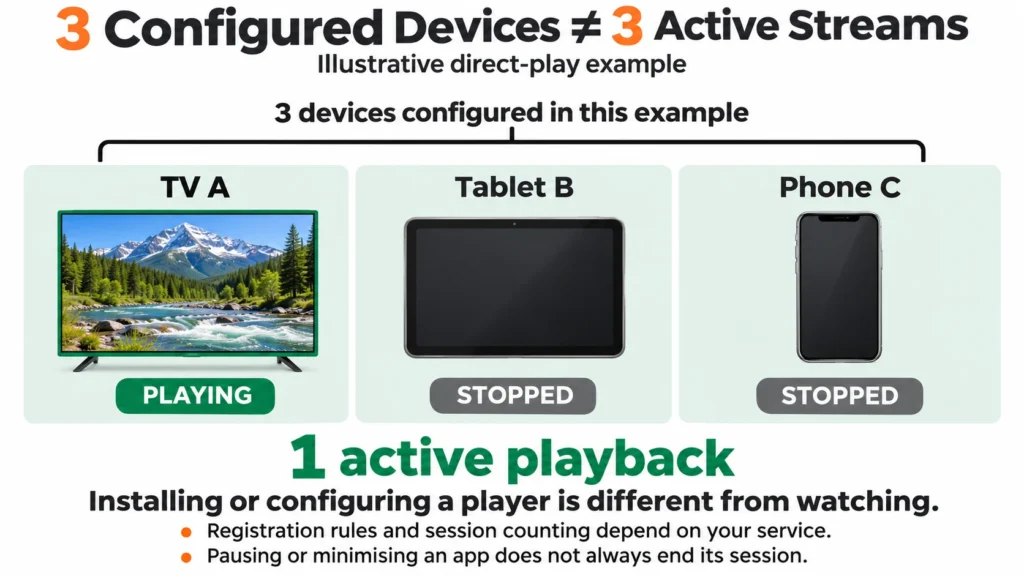
Possibly, but confirm both setup permission and active-use rules. Imagine three compatible devices configured with supported access, while only one is playing. That describes three installations and one independent playback in this example; it does not establish unlimited registrations or a right to share the account.
Keep these seven questions separate:
- Hardware: which device is connected to the network?
- Installation: is a player installed on that device?
- Player licence: does the app require a purchase or activation?
- Service authorisation: is this device or access method permitted?
- Source session: what playback or recording activity is being counted?
- Concurrent allowance: how much simultaneous use does the selected plan permit?
- Location rules: do the actual terms specify household, network or travel conditions?
An answer to one does not establish the others.
“Can I use IPTV on multiple devices?” therefore needs a more precise follow-up: do you want to switch between screens, watch different programmes together or use another location? Those activities can involve different requirements.
An idle configured phone is not necessarily playing. However, pausing, minimising an app or switching off a display does not universally establish that its session ended. Counting depends on the service and implementation; individual media requests are not a universal measure of chargeable streams.
If your question is “Can I use IPTV on multiple devices without interrupting the first screen?”, establish the allowance and stop unnecessary playback before testing. Count what the setup is doing, not merely how many devices are visible.
1. Can I use IPTV on multiple devices under my selected plan?
Read your selected order and current plan terms. Identify simultaneous access, any device-registration allowance and relevant location conditions separately. Wording about devices needs a definition: it might refer to registered hardware or screens playing together.
For IPTV Ireland Fast, the subscription page presents options for 1, 2 or 3 simultaneous devices, with durations of 3, 6, 12 or 24 months. It explains these as screens watched at the same time. Those options do not establish unrestricted registration, separate-household use or roaming permission.
Can I use IPTV on multiple devices with a longer subscription? Duration alone does not answer that question. A 12-month access period and a two-stream allowance describe different parts of an order. Confirm both rather than interpreting a larger number as more concurrent screens.
If terms remain unclear, ask support to describe your intended arrangement explicitly: which devices, how many playing together and whether they share a location. Keep the answer with your order information.
Can I use IPTV on multiple devices after purchasing another player licence? That purchase addresses the app’s licensing conditions. It does not itself modify the content service’s allowance. Establish the missing permission before buying anything.
2. Check each device and its exact player edition
Record each device model, operating system, app title, developer and version. Verify the official installation route and supported input method for each combination. Television, mobile and desktop editions may differ in controls, features and licensing.
When the additional device is an Android phone, our phone installation and playback guide covers its input, touch controls and data checks. Installing it does not add a simultaneous stream.
Use the device compatibility guide as context, then check the particular app. A device capable of streaming is not evidence that every player, source format or feature works on it. An overseas listing also does not establish availability for your Irish storefront and model.
Can I use IPTV on multiple devices with one app purchase? Check the player’s actual purchase terms: transfer, restoration, platform coverage and activation may be handled differently. There is no universal answer across apps, and a content subscription does not automatically include their paid features.
Write down which requirements are confirmed for each screen. If a television needs a different edition or activation, resolve that separately from simultaneous access. Avoid replacing working settings with instructions written for another platform.
Can I use IPTV on multiple devices when one app is already working? That is a useful starting point, not proof about the other installations. Confirm their supported setup and test them individually before drawing a conclusion about account limits.
3. Configure and test devices one at a time
Follow the service’s supported account, playlist or activation method on each permitted device. Do not assume the same credentials can be reused freely, or that a MAC-based arrangement is interchangeable with a different login format.
Stop existing playback through documented controls before a sequential comparison. Follow any provider-documented session-release behaviour; do not invent a fixed waiting period. Check recordings or playback elsewhere that might still be active.
Can I use IPTV on multiple devices if the second device will not play alone? That result does not establish a concurrency problem. First investigate its access method, activation, compatibility and exact error. An allowance for two streams cannot make an incorrectly configured player work.
Keep the content selection and test conditions reasonably consistent. Note whether access is accepted, the library loads and playback starts. Those stages provide more useful evidence than reporting that the device simply “does not work”.
Can I use IPTV on multiple devices once each passes a solo test? Individual success establishes only those tested configurations. Simultaneous use still requires permission and a separate controlled comparison. Preserve the successful settings so later failures are easier to interpret, and keep credentials and private links out of screenshots.
4. Count IPTV simultaneous streams before adding playback
In a simple direct-play illustration, TV A playing plus TV B playing means two independent playback sessions to check against the plan. A configured phone that is stopped is not a third independent playback in that illustration. The provider still determines its actual accounting rules.
IPTV simultaneous streams should not be counted solely by physical boxes. A recording job, picture-in-picture or multiview may request additional sources. Conversely, some architectures may handle shared sources differently; that must be verified rather than presumed.
Can I use IPTV on multiple devices while a recorder is running? Include that job in the question you ask support. Our recording guide explains why capture can introduce another source session and other requirements.
Watching the same programme on two screens does not automatically reduce their count to one. Likewise, a single screen displaying several live sources may involve more activity than its device count suggests.
Can I use IPTV on multiple devices up to the number advertised in my selected order? Confirm what that allowance covers in the intended arrangement, including recordings and other active viewing. Test within it. Do not open an extra screen simply to provoke an error or treat a failure beyond the allowance as a troubleshooting requirement.
5. Check shared broadband and each device’s connection
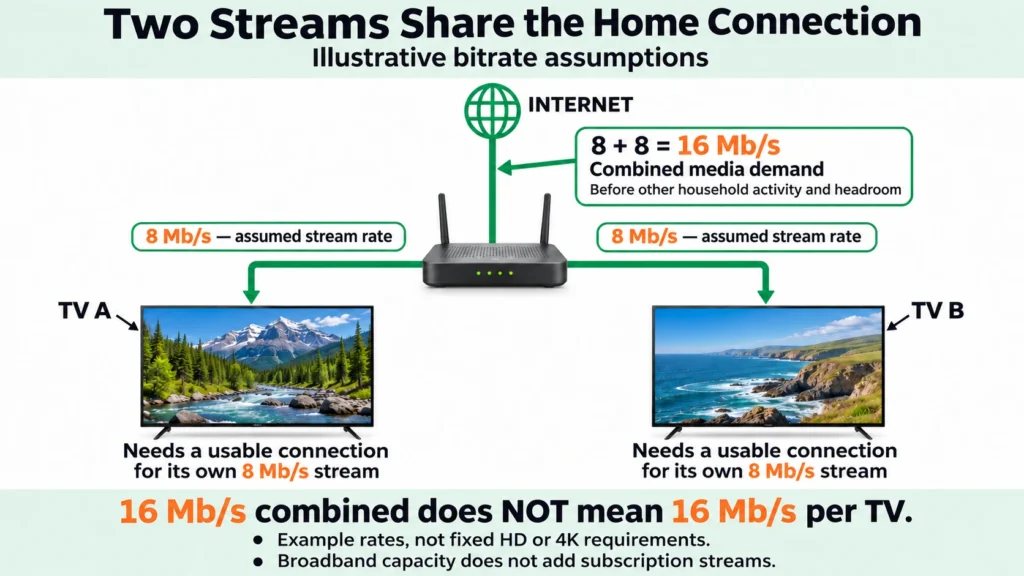
Separate the household’s combined media demand from the usable connection at each screen. As an illustration, assume a stream rate of 8 Mb/s on one television and 8 Mb/s on another. These are assumed inputs, not measurements from a real test. Together they create 8 + 8 = 16 Mb/s of shared media demand, before other activity and headroom.
Those assumed rates are not fixed HD or 4K requirements. Each television still needs a usable connection for its own 8 Mb/s stream; the arithmetic does not mean each needs 16 Mb/s individually. Our broadband-speed guide covers capacity assessment in more detail.
Can I use IPTV on multiple devices if a phone speed test looks good? A result beside the router does not establish the connection quality at a television in another room. Check the actual device location and whether interruptions affect one screen or several.
For Google TV, Google’s troubleshooting guidance includes checking the device connection, router placement and cabling where supported. Follow the relevant manufacturer instructions rather than transferring every Google TV setting to another platform.
Can I use IPTV on multiple devices after upgrading broadband? Extra capacity cannot add service permissions. Equally, a plan upgrade does not repair a weak Wi-Fi link. Identify which limit the evidence points towards before choosing a remedy.
6. Verify casting, background playback and location rules
A phone controlling playback on a receiver is different from a phone independently playing another source. Establish what the devices are doing before assuming that two illuminated screens equal two separate viewings.
The Google Cast interaction model describes a sender acting as a controller while a receiver plays content through its connection. This explains that supported architecture; it does not determine an IPTV provider’s session count or prove compatibility for your app and source.
Can I use IPTV on multiple devices by casting from my phone? Verify the app’s supported casting method, receiver compatibility and service rules. A Cast control alone does not establish that the supplied source will work. Screen mirroring should not automatically be treated as the same arrangement.
Check whether playback continues on a receiver, another app or a recorder after you stop using the phone. Use documented stop controls rather than assuming a minimised window released access.
Can I use IPTV on multiple devices at separate addresses or while travelling? Ask about those specific locations and networks. A simultaneous allowance does not itself grant sharing or travel rights, and no same-IP requirement should be invented either. Follow the actual terms rather than using VPNs, proxies or other methods to evade limits.
7. Diagnose conflicts with a controlled test
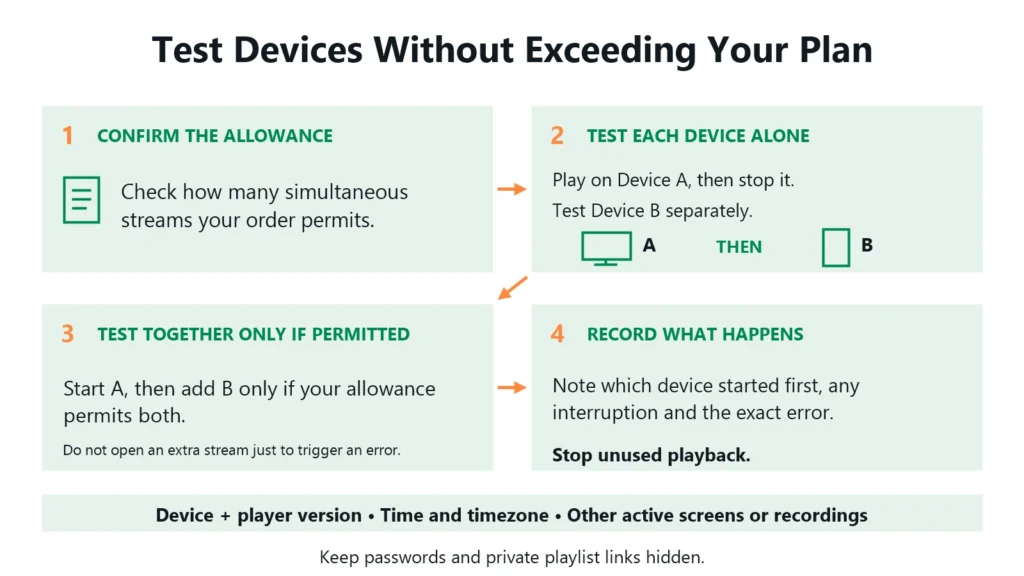
Only test concurrent use when it is permitted. Keep a short written sequence:
- Confirm the order allowance and stop unnecessary playback or recording.
- Test Device A alone, then stop it through its documented controls.
- Test Device B alone using its supported setup, then stop it.
- Only if the plan permits both, restart A and add B. Note which started first and the exact result.
Follow documented session-release behaviour throughout. Do not open anything beyond the confirmed allowance, and stop if the permitted test interrupts another viewer.
Can I use IPTV on multiple devices if the first stream stops when the second starts? That pattern is a clue about allowance, session handling or configuration. It does not prove an account ban, deliberate interference or provider misconduct. Note which device started first and the exact redacted message.
If both screens stutter, compare shared demand and each device’s connection separately from the account allowance. If only one fails even during solo playback, return to that device’s supported setup. These are different observations requiring different next checks.
Can I use IPTV on multiple devices after restarting everything? A restart may be appropriate under relevant device guidance, but changing several systems together can obscure the comparison. Avoid arbitrary cooldowns, MAC resets, factory resets or an account upgrade as automatic answers.
Stop unused playback and preserve the last working configurations. A successful controlled test supports only the devices, sources and conditions observed; it is not a guarantee of every future combination. Send unresolved conflicts to support with the allowed usage and active-session details.
“IPTV multiple devices”: a decision table
For a search such as “IPTV multiple devices”, the useful answer depends on the observation. Start with the relevant row rather than making a purchase based on device count alone.
| Observation | Next useful check | What it does not prove |
|---|---|---|
| Second device fails when tested alone | Verify its supported access, activation, app and device combination | That the simultaneous allowance caused the failure |
| Each device works alone but not together | Confirm permitted concurrent use, other active sessions and exact messages | That the provider banned the account or the network is definitely healthy |
| Multiple screens stutter | Compare shared household demand and each screen’s usable connection | That a higher-connection subscription will fix playback |
| A phone controls television playback | Identify the actual receiver and supported casting behaviour | That the provider counts exactly one or two sessions |
| A recorder is active | Ask how that job and other viewing count together | That one physical recorder uses only one session in every arrangement |
| Plan wording says “devices” without clarification | Ask whether it means registrations, simultaneous playback or something else | Unlimited installations, account sharing or separate-address permission |
Can I use IPTV on multiple devices? A hypothetical household example
Imagine a household whose order expressly permits two simultaneous direct-play sessions in its intended location. Both televisions have supported players and access methods. A phone is also configured where permitted but is stopped, with no independent playback or recording active.
Their question is: “Can I use IPTV on multiple devices while keeping the phone ready for later?” The relevant distinction is between its configuration and active use. The phone’s presence alone does not create a third independent playback in this illustration.
Assume each television’s media rate is 8 Mb/s for the calculation. The two together demand 16 Mb/s before other household activity and headroom. Neither television individually requires the combined 16 Mb/s for its own assumed stream.
They test each television alone, stop appropriately, then carry out the permitted two-screen test. Suppose both play successfully. That fictional outcome supports the tested arrangement, not unrestricted access from another home or automatic permission for the phone to start a third stream.
If they ask, “Can I use IPTV on multiple devices while recording too?”, another verification is needed. They would establish the recorder’s source use and the actual allowance before starting it. These permissions, rates and outcomes are illustrative assumptions, not reported customer results or tested product compatibility.
Can I use IPTV on multiple devices? What to send support
Make the request specific: “Can I use IPTV on multiple devices with this order, these apps and these intended locations?” Include what is known and leave uncertain rules as questions rather than assumptions.
A concise support report should contain:
- Selected order and confirmed simultaneous allowance, without payment details.
- Device models, operating systems, exact apps, developers and versions.
- Results when each device was tested alone.
- Results of permitted concurrent playback, including which started first.
- Other active screens, casting receivers, multiview sources and recording jobs.
- Date, time and timezone, using Irish local time where relevant.
- Exact redacted errors and the changes already tried.
- Any unresolved registration, location or player-licence question.
Do not post passwords, private playlist/server URLs or tokens. Avoid sending unnecessary network identifiers. Support needs to understand the arrangement, not obtain a public copy of your access.
Distinguish observations from conclusions. “The second screen loads its library but playback stops the first” tells support more than “multiple devices are blocked”. If session-release behaviour is uncertain, ask for the documented rule instead of assuming a cooldown duration.
Frequently asked questions
Can I use the same account on several devices?
Only where the service supports and permits that configuration. Can I use IPTV on multiple devices with identical credentials? Do not assume so: supported access, registrations and activation can differ. Verify the supplied setup method and separate it from the number of streams allowed together.
Is installing an app the same as adding a simultaneous stream?
No. Installation puts software on a device; concurrent access concerns active use under the service allowance. Player licensing is another condition. Can I use IPTV on multiple devices after installing the same app everywhere? Installation alone does not answer the permission, access or compatibility questions.
Can I watch IPTV on two devices at once?
Yes, if your selected allowance and intended use permit two active sessions, both setups are supported and the connections are usable. IPTV on two devices can also mean switching between them sequentially. Specify which activity you mean rather than treating those two situations as identical.
Does another player licence add a subscription stream?
No. The player licence governs the application purchase or activation; the streaming-service allowance governs permitted source use. Check transfer and platform coverage with the app seller. If you ask, “Can I use IPTV on multiple devices after buying this licence?”, get separate confirmation of the app entitlement and the service allowance before paying.
Does shared Wi-Fi permit use at different addresses?
No conclusion follows from sharing Wi-Fi at home. Can I use IPTV on multiple devices at another address? Ask the provider about that actual arrangement. Neither a shared router nor a multi-stream order establishes unrestricted household sharing, travel permission or a universal same-IP requirement.
Can I use IPTV on multiple devices by casting from my phone?
No universal count can be given. A controller and receiver can perform different roles, while independent phone playback is another activity. Verify the supported casting arrangement and provider accounting. Mirroring, receiver playback and simultaneous local playback should not be assumed to count identically.
Can recording or multiview use additional sessions?
Yes, they can request additional sources, depending on implementation. IPTV simultaneous streams should therefore be checked against active jobs and sources as well as screens. IPTV on two devices plus a recording may differ from two ordinary direct-play sessions. Confirm the arrangement before adding activity.
Your next step
Check the selected order, each player’s requirements and the activity actually running before buying more software or access. If “Can I use IPTV on multiple devices?” still has an uncertain answer for your setup, use our support page to confirm the allowance and any location rules. Then test only within those confirmed conditions.