
How to Get EPG on IPTV: Setup and Common Problems
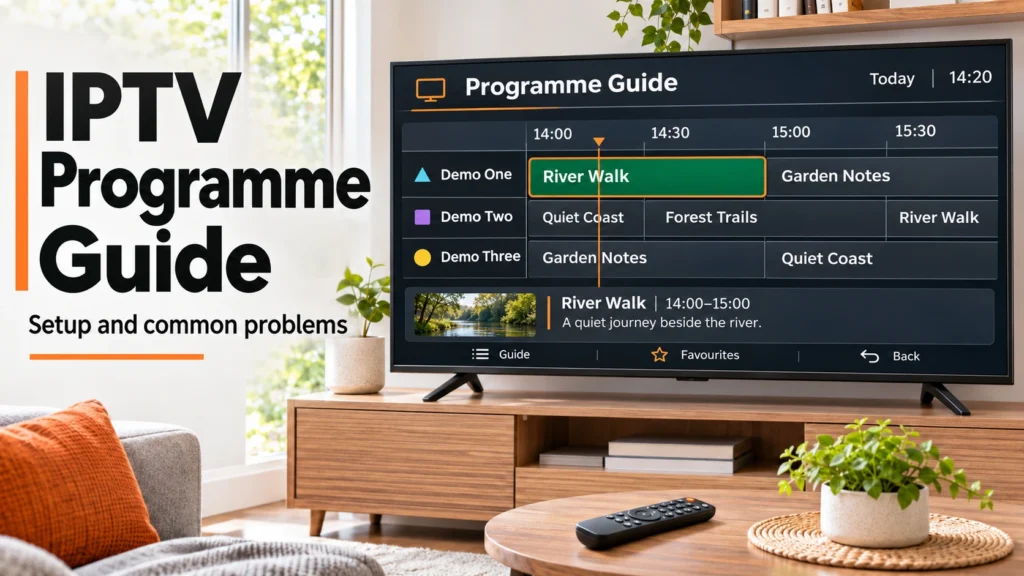
Set up a compatible programme guide and investigate missing listings, mismatched channels or incorrect times without changing unrelated playback settings.
On this page
Here is how to get EPG on IPTV: obtain the guide method your provider and player support, associate it with the intended playlist or account, refresh once as documented, then verify channels and programme times. Exact menus vary. Some account integrations supply listings without a separate XMLTV URL, so confirm the supported method before adding another source.
Understand what an IPTV EPG actually supplies
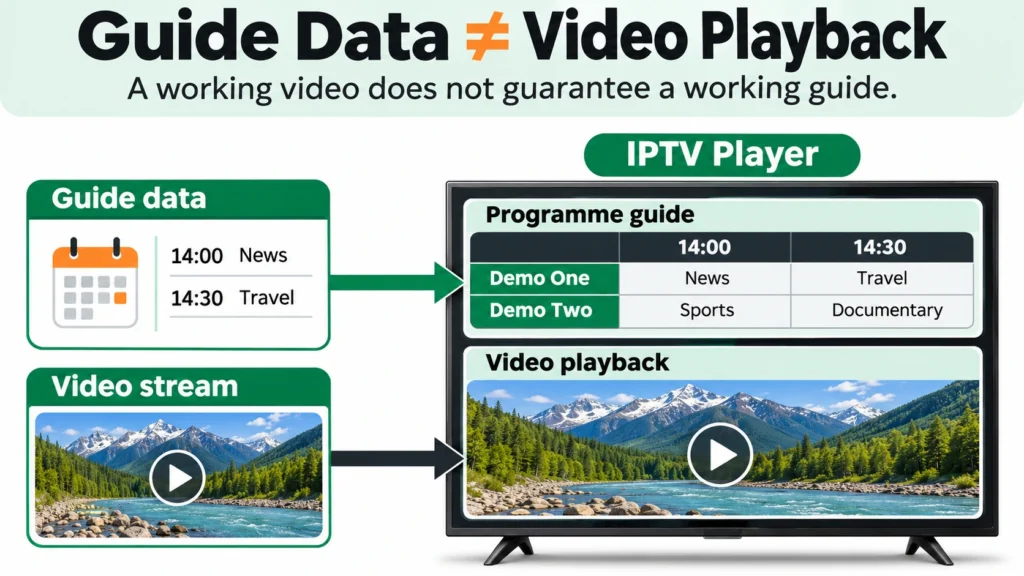
An electronic programme guide, or EPG, presents schedule information: programme names, broadcast times and any other descriptions the source supplies. Your stream playlist or account identifies the media you can access. The player brings these elements together on screen, but their successful operation is separate.
A channel may play while its schedule is blank. Equally, a guide may display programme names while the associated stream fails. Neither result establishes the condition of the other component. Our player-selection guide explains why supported functions matter more than a familiar app name.
XMLTV is a documented guide-data format, not a universal requirement for every service. Downloading a file does not prove the app can interpret it, associate it with your channels or find programmes for today’s date. A recognisable logo and channel name are not evidence of schedule coverage either.
When learning how to get EPG on IPTV, distinguish a current/next display from a multiday schedule. Neither automatically provides catch-up playback. A listing describes a programme; it does not supply the recording, grant viewing rights or establish permission to record it.
1. Identify your player and its supported guide method
Record the installed app’s full title, developer and version, plus your device model and operating system. Look up that exact combination through the developer’s genuine documentation or linked store listing. Phone and television builds may differ, even when their names resemble each other.
Before investigating how to get EPG on IPTV through an external feed, ask whether your account integration already supplies guide data. Other arrangements use a supported local file or remote guide URL. Some players have limited guide functions or put particular controls in a paid tier; verify rather than assuming.
Ask your provider: “Which guide method is supported for this app, version and device, with the access you supplied?” That gives support something concrete to answer. Do not construct an endpoint from a guessed domain, path or port.
Our device compatibility guidance provides wider platform context. Your next decision should still follow the actual app’s supported method. Knowing how to get EPG on IPTV starts with that match, rather than importing a file merely because another player accepts it.
2. Obtain and protect the correct IPTV EPG source
Use the guide supplied for your setup, or another legitimately authorised compatible source. Confirm which playlist or account it belongs to and whether it covers the specific channels you need. Schedule information alone does not provide the underlying video streams.
For the difference between channel-list input and programme data, see the M3U playlist guide.
An IPTV EPG source may be a private URL containing credentials or an access token. Keep it out of public validators, forum posts, screenshots and prompts. If you need help, describe the method and redact private details instead of publishing the address.
For how to get EPG on IPTV using a supplied URL, preserve it accurately, including paths, case-sensitive tokens and required parameters. Check for accidental spaces introduced when copying. Do not downgrade HTTPS, change ports or remove parts of the path to experiment.
Keep the original instructions privately so you can restore the previous configuration. If the source has changed, obtain the replacement through your provider’s established support route. Deciding how to get EPG on IPTV should not involve trying unrelated public feeds until something appears: a populated guide can still belong to different channels or regions.
3. How to get EPG on IPTV through a supported import workflow
Follow the workflow documented for your installed version. The general sequence is:
- Open the documented guide configuration for the intended playlist or account.
- Confirm the integrated method, or add the supported guide file/URL if required.
- Save the association without replacing unrelated stream settings.
- Trigger the documented refresh or import once.
- Note the result, then inspect several expected channels and dates.
The Kodi IPTV Simple developer repository documents an implementation using M3U playlists and XMLTV guide resources, including local and remote sources. It illustrates one supported arrangement, not a shared interface for every IPTV player. No release-specific menu sequence is assumed here.
When checking how to get EPG on IPTV, separate four outcomes:
- Downloaded: something was retrieved from the configured source.
- Parsed: the player recognised the retrieved content as guide data.
- Mapped: guide channels were associated with the intended playlist entries.
- Populated: programme rows appear for the dates you are viewing.
You may not have a separate status message for every stage. Record only what the interface or support actually confirms. A populated row may reflect cached data, so it does not by itself confirm that the latest refresh succeeded. A success notification may describe only one stage. Inspect the app’s documented status information where available rather than assigning it a meaning it does not state.
If the guide remains empty, preserve the settings and record the first stage you can verify. Understanding how to get EPG on IPTV becomes easier when “downloaded” and “usable listings” are treated as different results.
4. Match schedule entries to the intended channels
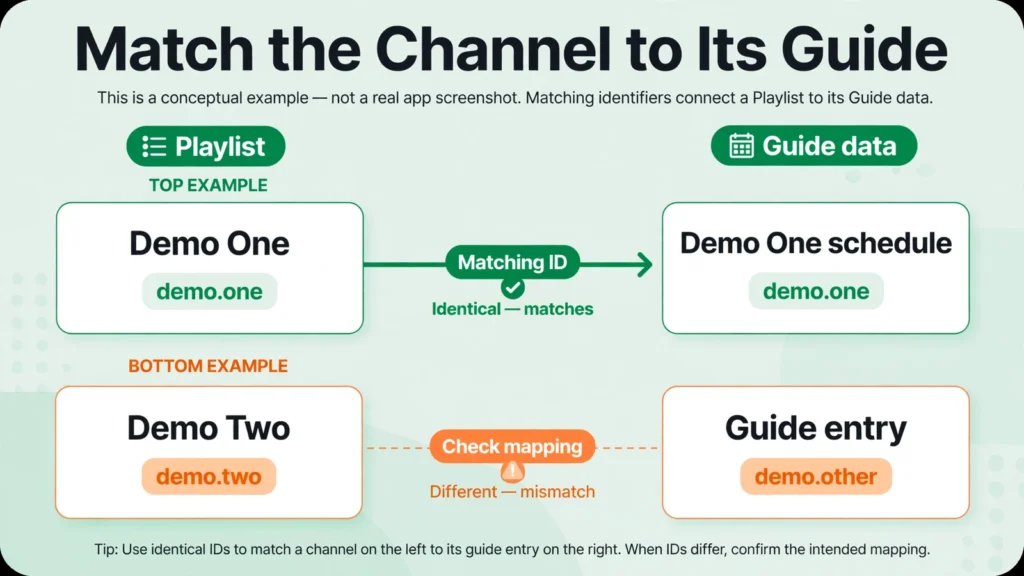
Channel mapping associates a playlist entry with the appropriate guide channel. Similar display names are not sufficient evidence of a correct match: regional editions, quality variants and time-shifted channels may need different treatment.
The XMLTV format definition describes channel identifiers and programme channel references. The programme reference associates schedule information with the corresponding channel identifier. This relationship within XMLTV does not itself define how every playlist format must work.
As an implementation example, the official Kodi wiki documents matching an M3U entry’s tvg-id with guide data and describes name-based fallbacks. Those fallback behaviours belong to that implementation; do not expect every player to apply them.
For how to get EPG on IPTV when only a few channels are blank, compare their identifiers with a channel that works, using supported tools and redacted information. Changing a logo or visible name may not change the underlying mapping.
For how to get EPG on IPTV with a supported identifier-based setup, think of three linked values: a playlist entry using tvg-id="demo.one", an XMLTV channel using id="demo.one", and its programmes using channel="demo.one". These are fictional fragments explaining the relationship, not a complete importable file.
Preserve original settings and test one channel before bulk changes. Ask the provider to correct supplied identifiers where appropriate. Learning how to get EPG on IPTV should not require rewriting your whole playlist when the evidence concerns one entry.
5. Check programme timestamps and local display time
Choose one known programme on a specific date and channel. Record its expected start time, the displayed time and the source of that expectation. Then compare another channel to establish whether the discrepancy is widespread or limited to one schedule.
When examining how to get EPG on IPTV to display correctly in Ireland, check the device’s automatically managed local timezone, such as Europe/Dublin where offered. Verify the actual clock as well. Consult device documentation for the relevant setting instead of imposing another platform’s menu.
Check three things separately: the device timezone, the feed’s timestamps and any guide shift already applied in the player. The XMLTV definition permits explicit timezone information and specifies UTC when it is omitted. XMLTV is therefore not an exclusively UTC-only format.
A correctly interpreted UTC feed can display local programme times without changing its timestamps seasonally. Summer and winter local offsets can differ; a permanent arbitrary one-hour adjustment may hide one mismatch while creating another later.
For how to get EPG on IPTV with a steady time discrepancy, record existing shifts before changing anything. A fixed gap suggests investigating time handling; it does not prove which component is wrong. Avoid shifting every channel to compensate for one incorrectly associated regional or time-shifted entry.
6. Investigate IPTV EPG not working by failure stage
“IPTV EPG not working” describes several different situations. All channels may be blank, some may lack coverage, listings may have expired or programme names may belong to another channel. Start with the scope rather than immediately deleting the configuration.
For how to get EPG on IPTV after an unsuccessful import, check what the result actually establishes. A reachable URL or HTTP 200 response can still deliver an HTML login or error page instead of usable XMLTV. Ask the provider or app support to verify the expected response securely; do not expose private URLs in public testing tools.
If parsing is confirmed, check whether the data contains programmes for the affected channels and dates. A freshly downloaded resource may still contain old schedules. Conversely, current programmes may be present but unmatched to your playlist entries.
Inspect one affected channel and one working comparison where possible. A successful row does not prove complete coverage. Change one variable at a time, retaining the original settings so the comparison remains useful.
Knowing how to get EPG on IPTV also means keeping metadata trouble separate from launch or login failures. Use the Smarters troubleshooting guide when the wider app problem is relevant to your installation. Reinstalling, clearing app data or buying faster broadband is not the first response to an unexplained blank schedule.
7. Keep listings current and escalate with evidence
Use the update controls and schedule documented for your player and source. Guide coverage and publication frequency depend on that arrangement; there is no universal refresh interval or guaranteed number of days supplied.
When considering how to get EPG on IPTV beyond the currently populated dates, ask whether the provider has published those future listings. Increasing a retention or display setting cannot create programme entries absent from the source. It may change what is shown without extending actual coverage.
Avoid repeatedly requesting the source while a refresh is already underway or retrying without new evidence. Follow the documented completion/status indications. If you cannot establish the outcome, note that uncertainty and contact support rather than inventing a waiting time.
A useful maintenance check is to inspect a few familiar channels, today’s date and a later date you expect to be covered. Record the last observed successful update when available, distinguishing it from the date of the programmes themselves.
For how to get EPG on IPTV reliably within your supported setup, keep recovery details and a concise record of changes. When a problem persists, send the source method, affected entries, displayed dates and refresh observations to the relevant support team.
Match the guide symptom to the next useful check
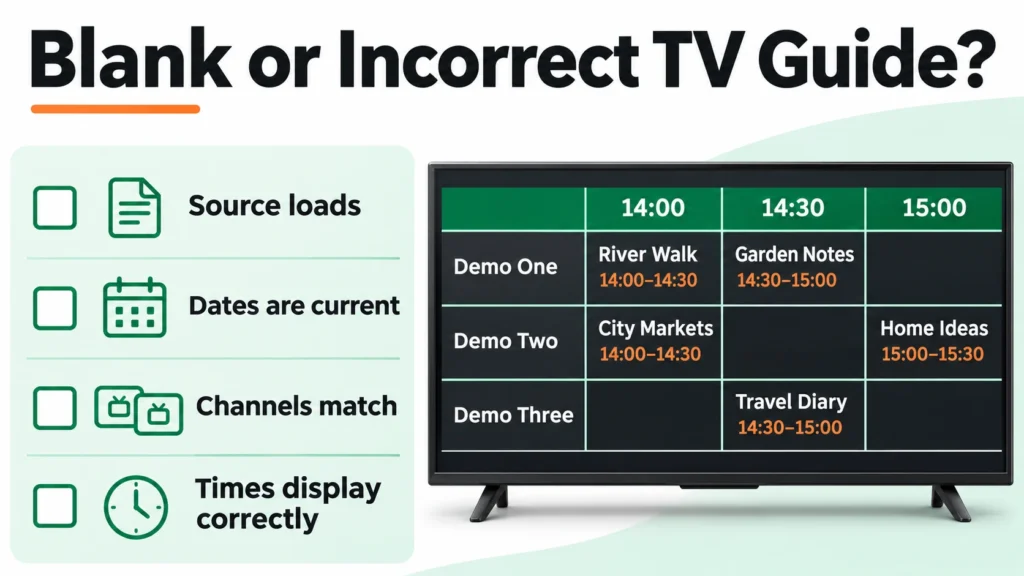
Use this table when deciding how to get EPG on IPTV without altering unrelated playback settings. The explanations are possibilities, not confirmed diagnoses.
| Observation | Possible explanation | Next useful check |
|---|---|---|
| Every channel is blank | Guide association, retrieval, parsing, date range or mapping may be involved | Confirm the selected source and the latest documented import outcome |
| Only some channels are blank | Coverage may be missing, or those entries may not match | Compare affected identifiers and dates with a working entry |
| Listings belong to the wrong channel | Mapping, regional edition or time-shifted variant may differ | Confirm the exact channel and associated guide identifier |
| Listings show old dates | The source may be outdated, or newer data may not have loaded | Compare programme dates with the reported refresh result |
| A steady time gap affects listings | Timezone conversion or an applied shift needs investigation | Compare device time, timestamp information and player shift separately |
| Download fails | Source access, supplied URL or connectivity may need checking | Preserve the original URL and ask whether that source remains valid |
| Download succeeds but parsing fails | The response may be incompatible or contain an error page | Ask support to verify the response type and supported format |
| Parsing succeeds but no rows populate | Entries may be unmapped or outside the displayed date range | Check identifiers and the dates actually present |
A hypothetical example: how to get EPG on IPTV when one identifier does not match
Imagine a fictional playlist containing Demo One and Demo Two. Current guide entries are confirmed for both, but the player displays only Demo One’s schedule. Playback is left unchanged while the mapping is investigated.
For Demo One, the playlist identifier is demo.one, the guide channel identifier is demo.one and its programme entries reference demo.one. For Demo Two, the playlist uses demo.two, while the intended guide channel uses demo.other.
These are explanatory identifiers, not complete files to import. In a player using the documented identifier relationship, that mismatch is worth checking with the provider. Other matching rules may also apply, so it is not a universal diagnosis.
In this example, how to get EPG on IPTV for the second entry means confirming the intended association before changing it. Suppose the provider confirms a supported correction: the viewer preserves the old value, adjusts that one mapping and performs the documented update.
If the expected schedule then appears, the result supports that correction for the tested entry. For how to get EPG on IPTV without losing a working setup, record the old association, the provider-confirmed replacement and the observed result. If nothing changes, restore the original value before investigating another possibility. It does not establish all-channel coverage. Understanding how to get EPG on IPTV through a controlled comparison avoids changing the stream source, timezone and app together. No real customer or device test is being described.
How to get EPG on IPTV: what to send to support
Contact the provider about the supplied source, expected channel/date coverage and identifiers in its playlist. Contact the app developer about supported formats, interpretation of status messages or reproducible parsing and display behaviour. Their responsibilities can overlap at the integration point.
A useful request about how to get EPG on IPTV states what loads and what remains absent. For example, say that the app reports a completed download but displays no programme entries for today’s date. Do not label that result a confirmed outage without further evidence.
Include:
- App title, developer and installed version.
- Device model and operating-system version.
- Guide method: integrated account, supported local file or remote XMLTV source.
- Affected channel references and identifiers, redacted where necessary.
- Whether all channels, selected channels or particular dates are affected.
- Displayed programme dates and the documented refresh result.
- Date/time of observation, including timezone and relevant Irish local time.
- Device timezone and existing guide shifts, plus comparisons already tried.
Keep passwords, tokens, private source URLs and account identifiers out of public reports and screenshots. If comparison playback is requested, respect the service’s simultaneous-stream allowance; guide retrieval should not automatically be treated as an additional playback session.
When asking how to get EPG on IPTV on an unfamiliar device, distinguish observed facts from unanswered questions. “I cannot verify whether parsing completed” gives support a useful starting point and is better than assigning an unsupported meaning to a success banner.
Frequently asked questions
Is EPG included with every playlist?
No. A playlist may identify playable streams without supplying usable schedule data. Some supported account integrations include guide information; others require a separate compatible source. How to get EPG on IPTV depends on the method available for your particular provider, playlist and player.
Does XMLTV contain channels?
It can contain channel definitions and programme listings, but those definitions are not the video streams themselves. An identifier or display name associates schedule information with a channel. It does not provide a subscription, establish playback access or guarantee that every playlist entry has current programmes.
Can guide data work while playback fails?
Yes. The guide and video are separate inputs or functions even when presented together. A populated schedule does not prove the stream is accessible, and a working stream does not prove guide retrieval or mapping works. Investigate the first component that actually fails.
Why do only some channels have listings?
Possible explanations include limited source coverage, different identifiers, regional variants or dates outside the supplied schedule. For how to get EPG on IPTV for those entries, compare one affected channel with a working one and confirm what the source is expected to provide before editing settings.
Does a programme guide unlock catch-up?
No. Past programme names are metadata, not archived video. Catch-up needs provider/source support, suitable access and compatible player handling. A guide entry alone does not establish that the programme can be watched again or recorded, regardless of whether a player displays a related control.
Why are programme times one hour wrong?
A one-hour gap can prompt checks of local timezone handling, feed timestamps and existing shifts, but does not identify a single cause. When checking how to get EPG on IPTV aligned with Irish viewing time, compare a known programme and avoid a permanent blanket correction without establishing the mismatch.
Will paying for premium guarantee complete listings?
No. A player upgrade may unlock documented application features, but it cannot guarantee source coverage, correct identifiers or future schedules. Confirm the exact missing capability before purchasing. Keeping the existing player and correcting the supported configuration may be the appropriate outcome.
Your next step
Confirm the guide method, intended playlist and current source coverage, then verify one channel and date before expanding the check. If you still need to establish how to get EPG on IPTV for your combination, use the supported setup guide to clarify the device and account arrangement. Preserve working access and take unresolved mapping or timestamp questions to support with evidence.