
Xtream Codes Explained: 7 Essential Setup Checks
Learn which account details your player needs, how to enter them correctly and what to check when login, channel lists or playback fail.
On this page
Xtream Codes, in everyday player setup, usually means three details supplied for your account: a server address, a username and a password. You enter them into a compatible player so it can request your channel list. They are separate from an app-download code, a player premium licence and the video streams themselves. Available content, features and playback depend on your supplier, your account and your player.
The most useful starting point is to identify who supplied each detail. Your app developer may handle the player purchase, while your account supplier provides the information needed to connect to its service. Similar-looking sign-in fields do not make those accounts interchangeable.
| Detail | What it is for | Who supplies it |
|---|---|---|
| Server address | Identifies the supplied service address used by the supported account method | The account supplier |
| Username | Identifies your account within that service | The account supplier |
| Password | Authenticates access to that account | The account supplier, through a private route |
| Optional profile name | Helps you recognise a saved connection where the player offers a local label | You choose it, following the player’s documentation |
Exact field labels differ by app and version. A profile name can be a local label rather than an authentication credential. Do not put an app-store receipt, activation code or playlist address into a field simply because it accepts text.
1. Xtream Codes IPTV: which details do you need?
Check the access information you actually received before opening the player. An account-based connection, a complete M3U URL, an M3U file and a portal/MAC arrangement are different input types. They should be used through the method your supplier and player support.
For Xtream Codes IPTV access, ask for the server address, username and password intended for that method. If your only information is an email address associated with buying the player, you have not yet established that you possess content-service credentials.
Keep the supplier’s Xtream Codes instructions alongside the fields while entering the account. Check whether they describe a supported account connection or a different input. If the wording is unclear, ask which method to choose rather than trying every available option.
Illustrative field map — not a working account
- Server:
https://media.example.com:8443 - Username:
EXAMPLE_USER - Password: supplied privately; never publish it.
- Local profile label:
Living room, only if the app offers one.
The hostname and port above are non-working examples for explanation, not recommended service settings. Use your real supplier’s complete address. Retain its scheme, host and port where supplied; do not invent a port or replace HTTPS with HTTP.
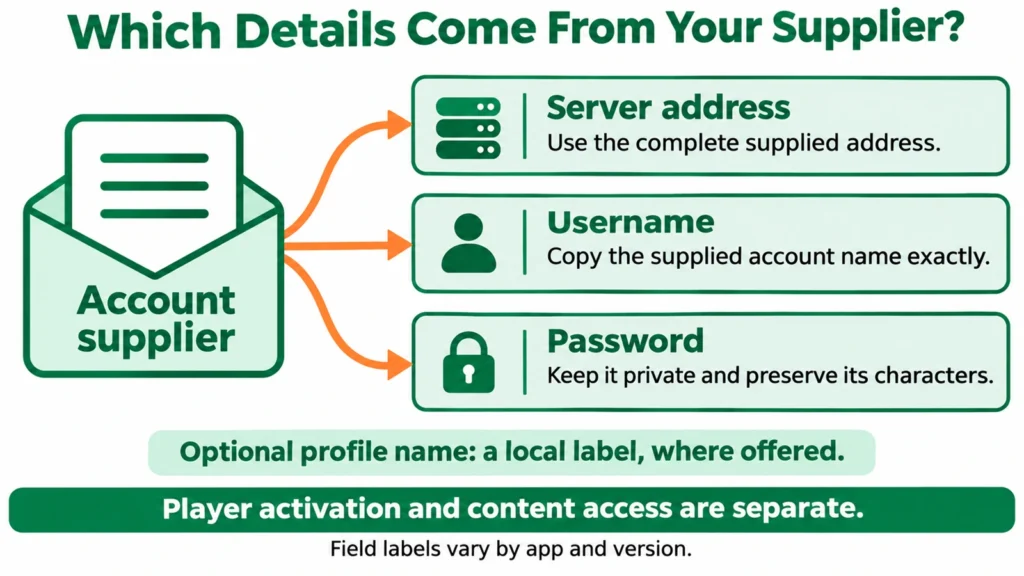
A full playlist URL with a path or query is not automatically the value for a server-address field. There is no universal rule that lets you strip parts away and obtain the correct account address. Request the supported server value from the supplier.
Treat Xtream Codes as a connection method for your own authorised account. Public lists of supposedly working credentials are not a substitute for confirming your access. If you are looking for free access, ask an authorised supplier about its actual offer rather than using someone else’s login.
2. Confirm Xtream Codes player compatibility and keep purchases separate
Record the exact app name, developer, device operating system and app version. An Xtream Codes option documented for one edition does not establish that another similarly named app has the same input or behaviour.
Check the developer’s current instructions for your edition before buying an upgrade or changing devices. Do not assume identical support across Samsung, LG, Apple TV, phones and Fire TV. App names and familiar branding are insufficient evidence of compatibility.
The TiviMate developer website explains that you add your own playlists; buying premium features does not provide channels. Check whether a payment concerns the player or the viewing service before making another purchase.
The Televizo developer website likewise describes an Android player that requires your own playlist. These examples explain the player/content distinction; they do not establish matching menus across apps.
Before an Xtream Codes setup, establish two things separately: whether the player supports the supplied method, and whether the service account is currently usable. An app licence does not confirm active viewing access, and a service subscription does not confirm that your chosen player accepts its input.
Use our guide to choosing an IPTV player for the broader comparison. For this connection, concentrate on the exact input, edition and device you intend to use. Verify developer provenance rather than following a lookalike website or installing a package because its name seems familiar.
Illustrative example: the player account went into the wrong fields
This example is fictional, not a customer report or a tested repair.
A reader pays for a player and receives an app-account confirmation. They enter that account’s email and password into the fields intended for content access. The connection fails, so they initially wonder whether another player purchase is needed.
The useful check is who issued those credentials. They identify the confirmation as an app purchase and ask their service supplier whether separate viewing details have been supplied. They then confirm which supported input belongs in the content connection flow.
This identifies an account mismatch without establishing that a corrected connection will necessarily play. The next test still needs the right details, current access and a compatible player. No extra purchase follows automatically from the failed attempt.
3. Enter an Xtream Codes login carefully
Use the following app-neutral sequence only when your exact player supports the supplied account method. It is a way to organise the entry process, not a verified set of buttons for every app.
- Find the documented add-account or add-playlist flow for your edition.
- Choose the matching account input method, if offered.
- Enter the supplied server address, preserving the scheme, hostname and any supplied port.
- Copy the username and password exactly, checking for accidental spaces and substituted characters.
- Add an optional profile label only as the documentation describes.
- Save once, then observe what happens during authentication, catalogue retrieval and playback.
For an Xtream Codes login, preserve the supplied case and punctuation rather than assuming a server will ignore differences. Check confusing characters against the original private message. Do not change the password’s capitalisation because another account accepted a different spelling.
Copying from a message can introduce surrounding spaces or capture neighbouring text. Inspect the field privately and correct only confirmed entry mistakes. Avoid showing a password or complete access address in a recording, shared screenshot or clipboard demonstration.
If you cannot tell which server address belongs with the account, stop and ask. Do not derive an endpoint from a playlist, probe possible addresses or use a public browser tool to test private credentials.
When the Xtream Codes connection is saved, note the result before retrying. A rejected login, an empty list and a visible catalogue with failed playback are different outcomes. Re-entering everything repeatedly can obscure the first useful error and will not clarify unsupported input.
4. Separate Xtream Codes login, catalogue, EPG and playback
A saved profile is not proof that every stage completed. The player may store the entered fields before it retrieves a catalogue, and visible names may reflect previously cached information. Test the stage you actually need to verify.
Use this table after adding Xtream Codes details:
| Observation | Useful next check | What it does not establish |
|---|---|---|
| Login is rejected | Correct input method, exact supplied details and current account status | One definite cause from the error alone |
| List is empty | Selected profile and documented filters or refresh action | Every media stream is unavailable |
| List is visible but a channel fails | One permitted channel’s actual playback result | Fresh account verification or a working media request |
| Picture plays but the guide is missing | Separate EPG data and channel mapping | The account format is wrong |
| Playback starts and then stalls | The buffering branch and observed connection conditions | Another login method will fix it |
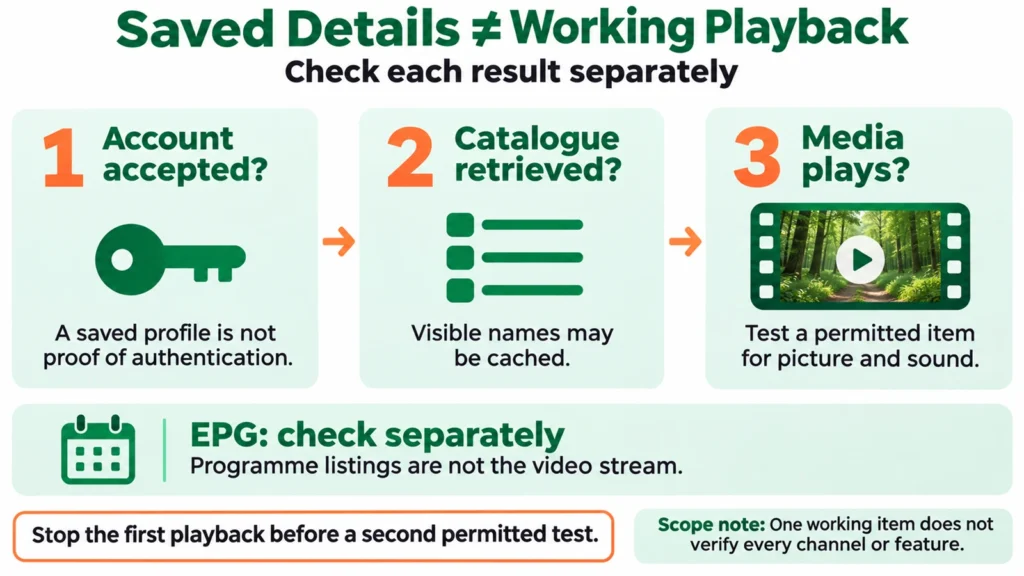
Choose a channel your account should currently be able to access. Observe whether picture and sound appear, then stop playback appropriately before testing a second permitted channel. Stay within the account’s simultaneous-stream allowance throughout.
One successful Xtream Codes playback request establishes that item worked under those conditions. It does not validate every channel, format, programme or feature. Ask the supplier about expected availability if a listed item is missing or unplayable.
EPG information is programme metadata, while VOD is an on-demand library and catch-up concerns earlier programming made available through a supported archive route. These features depend on the source, account and player. Their presence is not guaranteed by the login format.
If the picture plays but programme information is absent, follow the EPG setup and mapping guide. Keep a stream that never starts separate from one that starts and pauses; buffering checks address the latter rather than treating it as a rejected login.
Illustrative example: names appear, but the live test fails
This second example is fictional and does not describe an inspected account.
A reader opens a saved profile and sees channel names. Selecting one permitted item produces no picture or sound. They record the result, stop the attempt and try another eligible item on the same setup.
Whether the second item works or fails, the first observation remains limited: catalogue visibility did not establish working playback. The reader reports both results rather than declaring that the account is fully verified or the entire service is unavailable. The cause remains open pending further evidence.
5. Xtream Codes or M3U: use the supported input
The practical choice is the input your supplier provides and your player supports. Xtream Codes usually separates the server address, username and password into account-entry fields. M3U may be supplied as a local playlist file or a remote resource, with a different entry flow.
| Comparison | Account-based input | M3U input |
|---|---|---|
| What you enter | Supplied server address and account credentials | Supplied file or complete playlist URL |
| Compatibility check | Exact player edition supports that account method | Exact player edition supports the supplied resource |
| Private information | Credentials and account address need protection | A personal URL or file can also expose sensitive access details |
For example, Kodi IPTV Simple’s documentation distinguishes local M3U files, remote playlist addresses and XMLTV programme data. Those settings belong to that add-on; another player may organise the same resources differently.
A local file is a snapshot unless a separate supported process updates it. A remote resource can be requested again, but retrieval still needs to succeed. Neither should be treated as a public, login-free catalogue simply because it is called M3U.
Switching between M3U and Xtream Codes does not itself guarantee a sharper picture, viewing permission, guide coverage or reliable service. Compare actual supported behaviour rather than assuming one label represents a premium stream.
If you need M3U, ask the supplier for its supported form and confirm compatibility before replacing the existing profile. Do not construct a conversion template or send account information to an online converter. You do not need to explore API endpoints to enter a supported account.
Keep the original recovery information securely until the alternative has been checked. Our M3U playlist guide explains the file-versus-URL distinction and related handling in more detail.
6. Xtream Codes setup: what to check when it fails
Start with the smallest failed stage. If entry is rejected, compare the supplied details and input method first. If names load but video does not, preserve that distinction and make a controlled playback comparison rather than rebuilding the account immediately.
For Xtream Codes setup problems, work through low-impact checks in a recorded sequence:
- Verify the complete supplied address and exact username and password privately.
- Confirm current account status and the player’s supported method with the appropriate source.
- Check whether the device has internet connectivity, remembering that this does not validate the account or media server.
- Test one permitted channel, recording picture, sound and any sanitised error.
- Reopen the app or restart the device where appropriate, then repeat the same test.
- Check official app updates for your edition before considering more disruptive action.
Change one thing at a time. A different outcome is useful evidence about the changed conditions, not automatic proof that the underlying cause has been identified.
Keep Xtream Codes tests within your supplier’s simultaneous-stream allowance. Stop another active playback before a sequential test where necessary. Our guide to permitted simultaneous streams explains the difference between installed devices and active playback. Ask the supplier about a session that remains active rather than assuming a fixed release delay.
If a rate-limit or lockout message appears, stop repeated attempts and ask for the supported recovery procedure. Preserve the exact sanitised message. The same error number can mean different things across apps, so avoid treating it as a universal diagnosis.
For the relevant Smarters edition, use the Smarters troubleshooting guide. For a catalogue or media-start failure, follow the channels-not-loading checks. These branches help organise evidence without promising a particular repair.
Do not make a VPN, DNS change, certificate bypass, app-data deletion, reinstall or factory reset the default response. Before any supported action that could remove settings, preserve recovery details securely. An Xtream Codes connection problem alone does not establish that destructive changes are justified.
7. Keep Xtream Codes credentials private and prepare a useful support report
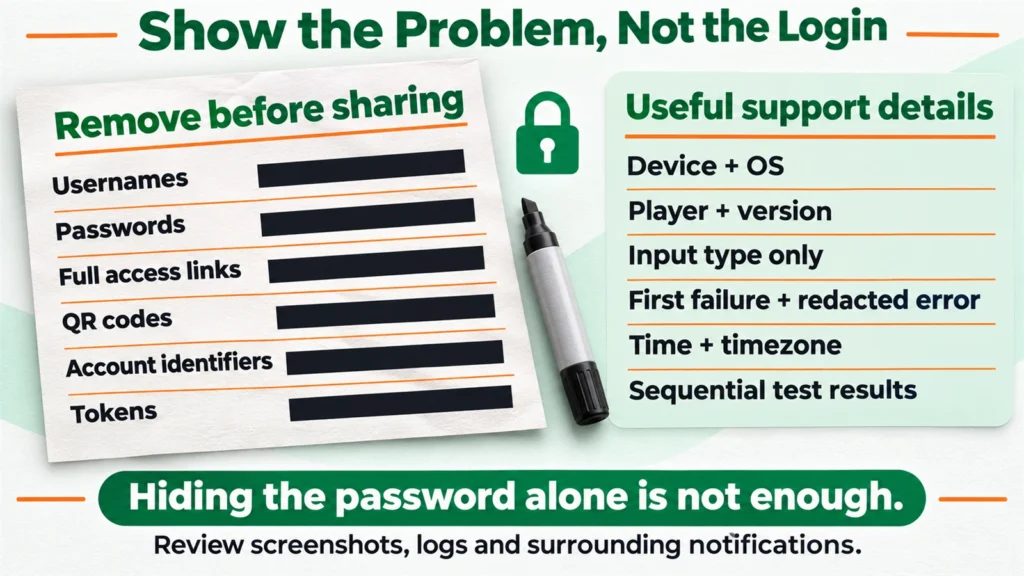
Treat Xtream Codes access details as private account information. A personal M3U URL may also contain sensitive credentials or tokens. Hiding the password field does not make every other visible detail safe to share.
Before sending an image, redact usernames, passwords, full access links, QR codes, private account identifiers and tokens. Review notifications and surrounding text too. Describe the input type without publishing the actual address or credential contents.
For Xtream Codes support, collect the following details. You can copy these labels into a private support message and fill them in without adding passwords or complete access links:
- Device and OS: model plus operating-system version.
- Player: exact app title, developer and installed version.
- Input method: account login, M3U or portal; describe the type only.
- First failure: entry rejected, empty catalogue, missing guide or unsuccessful playback.
- Error: the exact wording, with private values removed.
- Time: date, local time and timezone of the attempt.
- Controlled test: which permitted item you tried, whether picture and sound appeared, and whether another stream was stopped.
- Changes already made: one action and its result at a time.
Send player purchase or activation questions to app support. Send source-account, credential and expected-access questions to the account supplier. These routes identify who can clarify each part; they do not establish who caused a failed connection.
If your Xtream Codes details have been disclosed, request a credential reset through the supplier and follow its instructions for updating saved profiles. Removing a public screenshot alone does not establish that the exposed details are no longer usable.
Do not paste real secrets into model prompts, public forums or troubleshooting examples. A useful report explains the failure stage and tested conditions while keeping the means of accessing the account private.
Frequently asked questions
What are Xtream Codes?
In contemporary compatible-player setup, the term usually refers to a server address, username and password supplied for an account. The player must support that method. The label is not a guarantee of particular content, features or playback quality.
Are these the same as a player activation or download code?
No. An Xtream Codes login connects a supported content account. A player activation relates to the app, while a short download code helps locate an app package in a particular installation workflow. Neither supplies service credentials automatically.
Where do I get my own login details?
Request them from the authorised supplier of your account and confirm the supported input method. An app-purchase email may relate only to player features. Avoid shared credential lists or generators; establish what access has actually been supplied to you.
Can I use them in every IPTV app?
Not every app supports this input. Check the exact developer, device platform and version before entering Xtream Codes details. Another edition with a similar name may support different inputs or behave differently.
Does a login include channels or a player premium licence?
The account’s entitlement determines available content; the connection format does not promise a catalogue. A player premium licence is a separate purchase unless an explicit, verified arrangement says otherwise. Confirm both parts before paying again.
Is M3U better, and can I get a supported M3U URL?
Neither method is inherently a quality guarantee. Ask your supplier whether a supported M3U resource is available for your player. Obtain that form directly instead of deriving an assumed URL or disclosing credentials to a converter.
Why can a list load while playback fails?
Catalogue data and media playback are separate requests, and names may remain cached. Record the result for one permitted channel rather than treating list visibility as complete verification. A failed item alone does not identify the cause.
What should I do if I have shared my details?
Ask the supplier to reset exposed Xtream Codes credentials, remove public copies where possible and update authorised profiles as instructed. Review the whole disclosure, including private URLs and QR codes, rather than changing only what appeared in a password field.
Your next step
Identify which access method you received, confirm compatibility with your exact player and test one authorised channel. If your Xtream Codes connection stops at login, catalogue retrieval or playback, keep that stage clear when requesting help. Use the setup guides for the relevant next step without assuming another purchase will fix the problem.