
Best IPTV Player for LG TV: 7 Practical Checks Before You Choose
Compare LG TV player options by model, supplied input and everyday remote tasks, then check playback and purchase terms before choosing.
On this page
The best IPTV player for LG TV is the one that supports your actual television, accepts your supplied input and handles the remote tasks you need comfortably. Start with the model and real store availability, then test one permitted item for picture, sound and navigation before accepting purchase terms. Smart IPTV and SS IPTV are documented candidates, not hands-on winners. Player software, an upload code and viewing access are separate things; none alone establishes that your intended programme will play.
LG selection needs more than a familiar app name. Your television may use webOS or an older platform, your remote may offer pointing or directional controls, and the reference displayed by an app may be a device ID rather than a MAC address. Check each question separately.
1. Identify the television before choosing the best IPTV player for LG TV
Record the full model code, installed software build and service country. Identify the platform from the relevant model documentation rather than assuming that all LG smart televisions run the same software. Older LG platforms, including NetCast, need their own compatibility checks.
LG’s UK webOS guide describes exploring applications through its store. Store names and layouts can differ across generations, so seeing “Apps” in one guide and “LG Content Store” in another does not establish identical controls on your television.
Keep platform, installed software build and app build as separate fields. A firmware number is not automatically the webOS platform version, and purchase year is not a complete model record. Two households can own LG televisions yet need different guidance. The model record, rather than the brand name alone, establishes which documentation to consult.
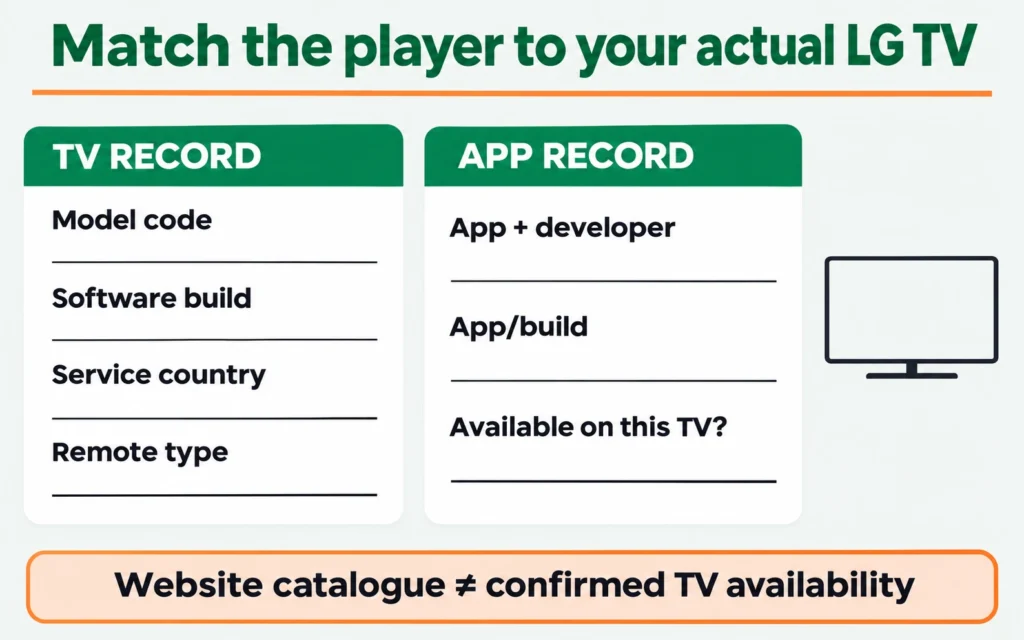
For the best IPTV player for LG TV decision, start with this private record:
- Model code: __________
- Platform, if verified: __________
- Installed software build: __________
- Service country: __________
- Remote type: __________
- Candidate app and build: __________
Record whether you have a conventional remote or a Magic Remote, without assuming that every LG set includes pointing controls. Do not publish serial numbers, account credentials or the app’s private device reference in a general compatibility question.
The best IPTV player for LG TV should fit the television already identified. Activation or a newer tutorial cannot make a different platform’s software compatible. For the broader installation process, use our smart-TV setup guide rather than treating this comparison as a universal installation manual.
2. Find the best IPTV player for LG TV in the actual store
LG’s official app-availability FAQ explains that website and television availability can differ according to model, country, device specifications and provider support. Its US-hosted documentation is general guidance, not evidence that an app is present on a particular UK or Ireland television.
Search the store available on your own set and confirm the exact app and developer. Compare the listing with the developer’s site, especially when names look similar. Check:
- The app title and developer identity.
- The stated supported inputs and TV requirements.
- A developer website or support route you can verify.
Keep the relevant service-country setting in your record. A country change does not guarantee availability; do not use it to bypass regional restrictions.
When investigating the best IPTV player for LG TV, distinguish a documented developer route from an observed store result. The following candidates deserve checking, but neither row is a completed compatibility test.
| Candidate | Documented evidence | Confirm on your TV |
|---|---|---|
| Smart IPTV | Developer provides an LG store route and platform-specific control/playback guidance | Genuine app identity, model availability, supplied input and current-build controls |
| SS IPTV | Developer’s LG section names an official store route using the older “LG Smart World” terminology | Current local store result, exact model support and relevant playlist workflow |
Smart IPTV’s instructions are useful because they identify LG-specific considerations. They do not establish a universal format matrix or prove that a particular track or guide function is available from your source. Do not apply an older shortcut list to every modern remote.
SS IPTV’s installation page supplies an LG route, but its older store wording is not a screenshot of today’s interface. Verify it on your model. Instructions elsewhere on that page for another manufacturer or platform are not LG installation instructions.
Keep unresolved questions in your shortlist for the best IPTV player for LG TV. If a similar name appears but the developer cannot be confirmed, pause at that stage. A familiar logo does not establish that you found the product described in the documentation.
These IPTV players for LG TV are documented options to investigate, not a popularity ranking. If neither appears, retain the model record and ask about supported availability instead of moving directly to developer mode or forced installation.
3. Match the best IPTV player for LG TV to your input
Identify whether your supplier gave you a playlist file, a complete remote playlist link or account-based access. The best IPTV player for LG TV needs a documented route for that actual input; similar-looking entry fields are not interchangeable.
To find the best IPTV player for LG TV for your supplied access, distinguish four roles:
- Playlist resource: a supplied file or complete link that the supported workflow reads.
- Account input: server and login fields, only where the player documents that method.
- Temporary upload code: a reference for a particular configuration task.
- App device reference: the identifier displayed by the installed player for its documented portal.
A file and a remote link also behave differently: one is a saved resource, while the other identifies a resource to retrieve. Our M3U file and link explanation covers that distinction. If you receive server, username and password details, use the account-input checks and verify a compatible workflow rather than deriving a URL yourself.
SS IPTV’s playlist documentation distinguishes external links from internal uploads using a non-permanent access code. It documents M3U for internal uploads and additional external playlist formats. That is playlist-handling evidence, not proof of a direct three-field Xtream login.
A temporary upload code associates a configuration task with the app. It is not a content-subscription trial, a channel password or proof that software has been paid for. Use the supported route for your build rather than copying old menu labels as current instructions.
The Smart IPTV FAQ makes a different LG-specific distinction: since its LG webOS app version 3.0.0, it uses a device ID because MAC access is unavailable. Its continuity notes cover previously activated televisions and older upload references. Follow the identifier and portal instructions for your actual app/build; do not generalise that behaviour to every player.
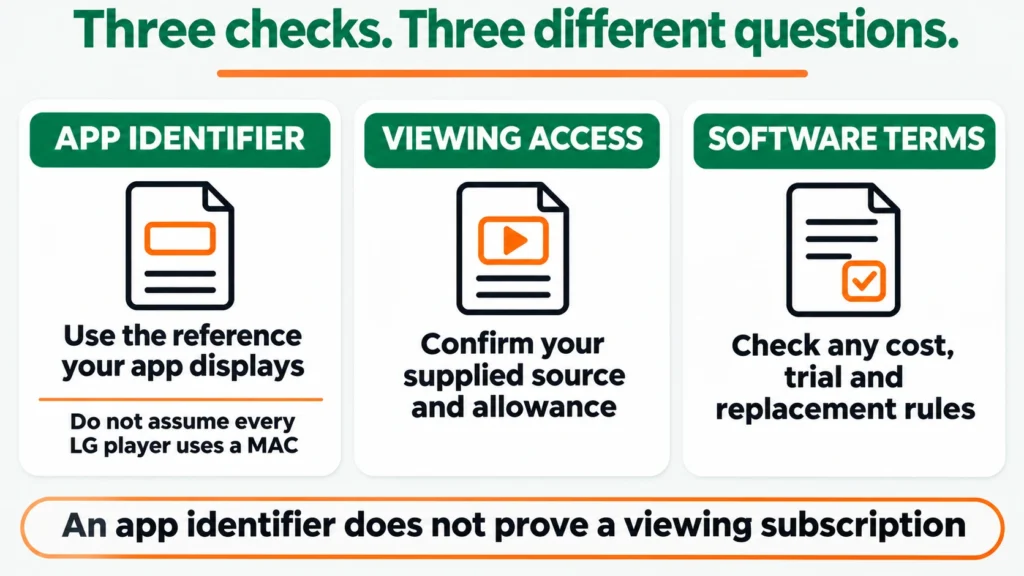
For the best IPTV player for LG TV comparison, ask your supplier which input was provided and which workflow they support on your model. An app identifier is different from the supplier’s login, but can still authorise a sensitive configuration task. Its presence does not prove a paid licence or current viewing entitlement.
Keep real identifiers, complete private URLs, tokens and QR codes out of public screenshots. Do not use public converters or invent endpoints. Preserve a recovery route before replacing a working internal playlist merely to test another option.
4. Test pointer and directional navigation with your own remote
Remote comfort is a practical part of finding the best IPTV player for LG TV. Test from the normal seat, using the remote you already own. There is no need to buy a Magic Remote simply to complete the comparison.
LG’s Magic Remote developer guidance distinguishes pointing from five-way directional navigation. Directional input can switch modes and hide the pointer. Pointer disappearance during that change is therefore not, by itself, evidence of a playback fault.
If pointing is available, test it separately from directional focus. Can you identify the selected item, reach an available option and return to the intended list? With a conventional remote, record the controls you have rather than treating the missing pointer as a failed feature.
Remote task record
| Task | Directional result | Pointer result, if available |
|---|---|---|
| Find a supplied item | __________ | __________ |
| Read guide text, if supplied | __________ | __________ |
| Select an available option | __________ | __________ |
| Return from playback | __________ | __________ |
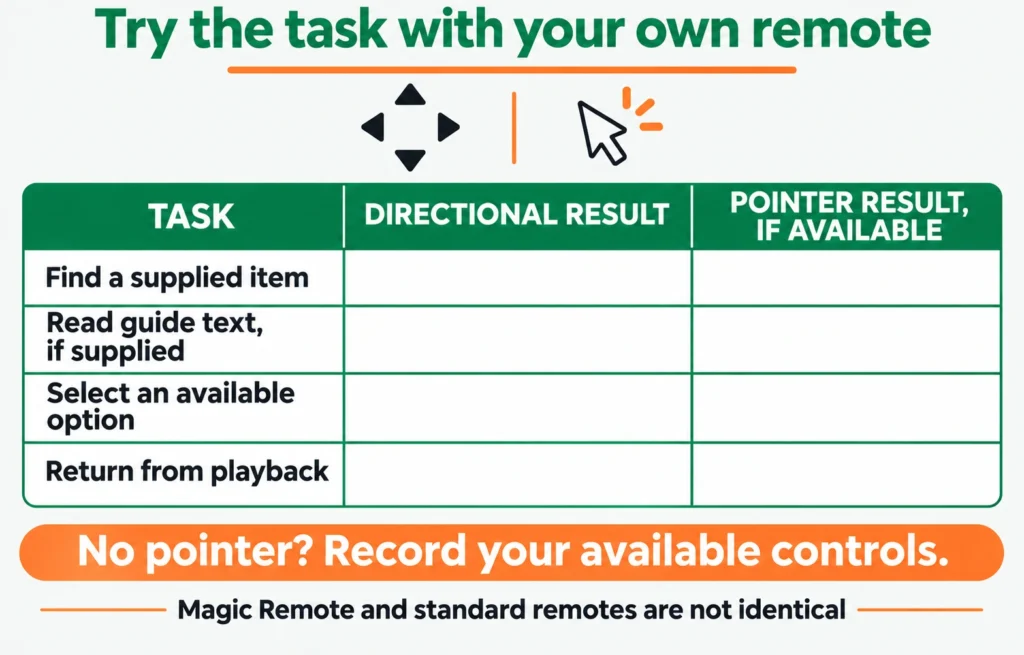
Leave untested fields blank. Add a short note about what was awkward: losing the selection, unclear focus, text that is difficult to read or an unexpected destination after leaving playback. These observations are more useful than awarding an unsupported usability score.
Back behaviour also involves application handling and platform context, as LG’s developer guidance explains. Record where you started and where you arrived rather than assuming every Back action should produce the same screen in both candidates.
The best IPTV player for LG TV for your household may be the candidate whose directional navigation suits your repeated tasks. Another household may prefer pointing. That preference needs your own observation; it cannot be established by a generic remote diagram.
When comparing IPTV apps for LG TV, test the whole action rather than pointer visibility alone. A visible cursor does not prove that guide reading or list navigation is comfortable, and successful directional selection does not establish working media playback.
5. Verify the best IPTV player for LG TV through playback checks
Choose one item your account should currently be able to access. Keep the television, app and connection unchanged for the first attempt, then record catalogue visibility, picture and sound separately.
The best IPTV player for LG TV cannot be identified from a loaded list alone. Saved or retrieved entries can appear while a particular media request fails. Record the selected item and exact sanitised error rather than treating catalogue visibility as complete account verification.
Smart IPTV’s FAQ states that it supplies no channels and notes television/source format dependencies. That supports checking actual playback, without diagnosing every failure as a codec problem or promising universal resolution, track or archive support.
Use these observations to choose the next question:
- No catalogue: check the supplied input and supported retrieval route.
- Catalogue but no video: investigate the particular permitted media request.
- Picture without sound: check supplied tracks, app handling and intended output.
- Video but no schedule: inspect guide data and mapping separately.
- Missing optional function: confirm source, device, build and entitlement conditions before assigning a cause.
Our catalogue-versus-playback guide covers the wider failure stages. For an empty schedule, use the programme-guide checks; a missing EPG does not automatically invalidate working live video.
The best IPTV player for LG TV decision should also distinguish an unavailable track from one that is not selected or exposed through the current route. Record what appears. Neither an old subtitle shortcut nor a paid unlock guarantees that your intended source offers the required option.
Hypothetical example: navigation works, but one item is silent
This hypothetical example shows why choosing the best IPTV player for LG TV requires separate observations. It is not a real customer report or installed-player test.
A viewer can find and select an item using directional navigation. The permitted item shows picture, but no sound is audible. They record the navigation result and the separate playback observation, then consult the no-sound checks for that branch.
The working controls do not explain the silence. Equally, the silent item does not prove that directional navigation or the app as a whole is faulty. The cause remains unresolved until further evidence supports a conclusion.
6. Read the applicable cost, trial and replacement terms
Before paying for the best IPTV player for LG TV for your needs, establish whether that candidate actually requires payment for the intended function. Do not assume that both apps charge activation, share a trial duration or offer the same licence conditions.
When choosing the best IPTV player for LG TV, keep software cost, viewing access and optional hardware separate. A player purchase does not supply missing content or repair an incompatible source. A supplier’s viewing trial is also different from any developer’s app trial.
Record the current offer privately:
- Exact app/developer and the function covered.
- Any amount, currency and billing period shown.
- Whether a charge recurs or is one-time under the offer.
- Trial conditions, if an app trial is actually offered.
- The device reference and applicable replacement/transfer rules.
- Purchase-support and account-recovery routes.
For the best IPTV player for LG TV comparison, ask what happens if the television changes. Developer activation and supplier viewing access are different questions. A previous receipt or an old upload reference does not establish that every part transfers to another set.
Do not confuse a non-permanent configuration code with the duration of paid access. Likewise, an app accepting a device ID does not establish licence status. Confirm the actual developer terms before relying on either assumption.
When shortlisting the best IPTV player for LG TV, consider paid extras only if their current scope addresses a verified need. If existing use already meets that need, there is no reason to add payment as a troubleshooting experiment. If entitlement appears unclear after payment, check the relevant receipt and reference before paying again.
Keep the best IPTV player for LG TV purchase decision open while an essential term is unanswered. For example, ask whether an activation follows a replacement television, quoting the app/build and the applicable purchase. Keep receipts and identifiers private; another player’s transfer policy does not answer that question.
7. Compare the best IPTV player for LG TV candidates sequentially
Use the same TV, intended network and permitted source where each candidate supports it. Stop the first playback before another authorised test. Your supplier’s simultaneous-stream allowance is independent of how many player apps are installed.
A controlled comparison helps identify the best IPTV player for LG TV for a specific task. Keep the app/build and any input-method difference in the record; changing the source route as well as the player can change more than one condition.
| Check | Candidate A result | Candidate B result |
|---|---|---|
| Found on this model/store | __________ | __________ |
| Supported input retrieved | __________ | __________ |
| Permitted picture and sound | __________ | __________ |
| Required remote task | __________ | __________ |
| Applicable terms understood | __________ | __________ |
Add the attempt date, time and timezone where relevant. While shortlisting the best IPTV player for LG TV, record untested tasks as untested. One item playing establishes that request under those conditions; it does not validate every format, programme or optional feature.
For the best IPTV player for LG TV decision, a useful conditional recommendation is straightforward: consider the candidate that is actually available, accepts your supported input, plays the permitted item and meets the required remote task under acceptable terms. If a required check fails, clarify that stage before choosing.
If no native option meets the verified requirements, investigate a compatible external HDMI platform separately. It has its own app/store and hardware conditions. An Android APK is not a native webOS app, and a separate device does not install Android into the television.
Do not buy hardware merely because one candidate is absent. Compare the actual alternatives and keep a working profile until a supported recovery route is secure. Forced sideloading, developer mode, factory reset and profile deletion are not necessary shopping steps.
These IPTV players for LG TV remain candidates until your setup supplies the results. For broader selection criteria, our general player guide can help organise the requirements without inventing a better unresearched alternative.
Frequently asked questions
Which is the best IPTV player for LG TV?
Choose by actual model/store availability, supported input, remote tasks, playback and current terms. Smart IPTV and SS IPTV are documented candidates, not proven universal winners. The strongest choice is the one that meets your verified household requirement.
What if an app is on a website but absent from my television?
Check the exact model, service country and developer support. Website and TV availability can differ. Do not assume a country change, an older installation guide or another platform’s package will make it available.
Can I install an Android APK on webOS?
Do not treat an Android package as a native webOS installation route. The best IPTV player for LG TV needs to match the actual platform. An external Android device is a separate system to evaluate, not an app installed on the LG set.
Why does the pointer disappear when I use directional buttons?
LG documents a switch from pointer to directional mode, where the cursor is hidden. That alone does not establish a fault. Check whether directional focus and the intended task work before changing settings or blaming playback.
Do I need to buy a Magic Remote?
Not simply to compare players. Test your existing remote and required tasks first. When evaluating IPTV apps for LG TV, missing pointing controls are different from unusable navigation; a conventional remote result may meet your needs.
Is an M3U link the same as an upload code or device ID?
No. The playlist identifies supplied content information, while an app code or device reference serves its documented configuration purpose. Keep each private and use the actual app/build’s route. None alone proves current viewing entitlement.
Does buying player software include viewing access?
Do not assume so. Finding the best IPTV player for LG TV is separate from obtaining your authorised source. Confirm software scope and supplier access independently; an identifier, licence or visible list does not establish all three.
What happens to activation when I replace the television?
Check that player’s current terms and replacement instructions. Do not transfer another app’s MAC, device-ID, trial or licence rules to it. Confirm software continuity and supplier access separately before relying on the old setup.
Your next step
Gather the model, software build, input type and one required remote task. Use that record to investigate the best IPTV player for LG TV for your setup, then test sequentially before accepting any purchase terms. If a stage remains unclear, request setup assistance with sanitised details and the first unresolved observation.