
How to Watch IPTV on Android Phone: 7 Practical Checks
Set up an authorised IPTV source on an Android phone, distinguish playlist and account inputs, test picture and sound, and keep mobile data use in view.
On this page
To learn how to watch IPTV on Android phone, start with current authorised viewing access and an app that supports the input your supplier provides. Install the verified phone app, load the supported playlist or account method, then test one permitted item for picture and sound. Check touch controls and mobile-data use before a longer session. For the playlist-player example used here, you supply viewing access separately. Installing it does not activate a content account or permit extra simultaneous streams.
The route should fit a touchscreen phone, not an Android TV remote. Keep your phone model, Android version and supplied input to hand. Those details determine which installation and import instructions apply, and they make any later support request more useful.
1. How to watch IPTV on Android phone: identify your input
Record the phone model and Android version before choosing software. Check whether the intended app is offered for that device and account. A player appearing in a browser does not establish that you can install its current edition on your phone.
Next, identify what the supplier actually gave you. A local playlist file is something you select through a supported file route. A remote playlist URL is a complete address the app retrieves. Xtream-style access instead uses account details through a compatible account-input method.
Understanding these differences is the first practical part of how to watch IPTV on Android phone. They are not interchangeable text to paste into whichever field appears. Our M3U file and playlist URL guide explains the playlist distinction in more detail.
Keep the original supplied information securely. Preserve complete URLs, including their supplied components. Do not shorten an address, guess an endpoint or submit credentials to a public converter because the expected input is unclear.
Your phone’s Google account, a player purchase and your supplier credentials also serve different purposes. The Google account can relate to obtaining the app; a player purchase concerns its software entitlement; supplier details concern viewing access. Use the Xtream Codes login explanation if you need to identify account-based access.
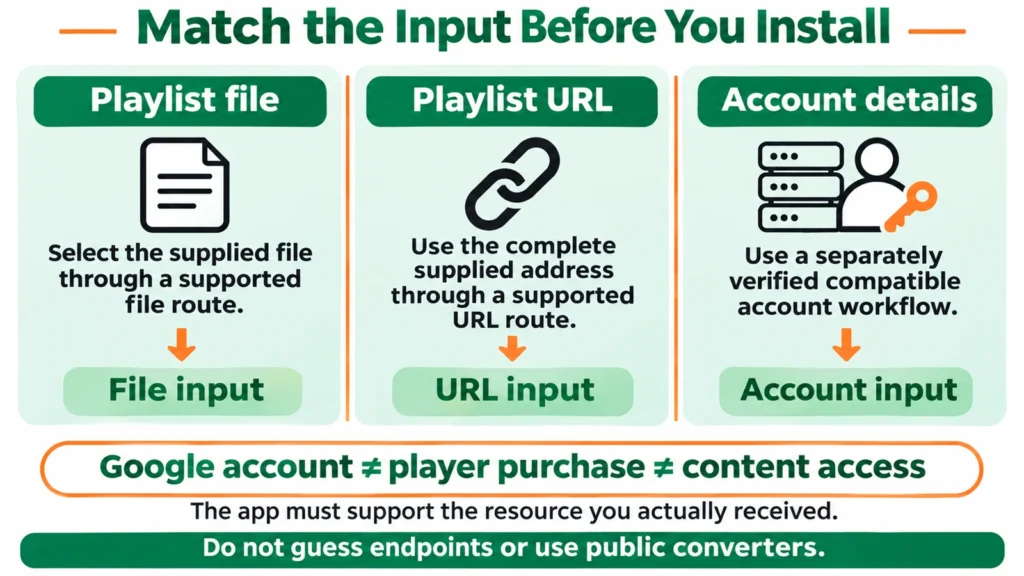
Before following instructions for how to watch IPTV on Android phone, check which input they assume. If yours differs, obtain the supported form or choose a separately verified compatible app. Changing the label on a saved profile cannot turn one input type into another.
2. Choose a phone-compatible player from a verified source
One documented candidate is IPTV by Alexander Sofronov, package ru.iptvremote.android.iptv. Its listing describes M3U/XSPF playlists, XMLTV/JTV guide support and internal/external playback options. It requires users to supply their own playlist. These are developer-described capabilities, not hands-on findings.
For anyone checking how to watch IPTV on Android phone, this is an example to assess rather than a universal recommendation. The accessible listing does not establish an Xtream credential-entry workflow, and current installation availability still needs checking on your phone/account.
| Supplied input | Documented candidate fit | Next action |
|---|---|---|
| M3U file or complete playlist URL | M3U support is listed; exact import route needs checking | Match the supplied form to current app help |
| XSPF playlist | XSPF support is listed | Confirm how the phone edition accepts your supplied resource |
| Xtream server, username and password | Account-field entry is not established by this listing | Verify a compatible account workflow elsewhere or request a supported playlist form |
A suitable IPTV player for Android phone use needs controls you can operate by touch. Check whether you can read channel names, recognise the selected item and leave playback easily. Do not assume an interface intended for a television remote is comfortable on a small display.
The listing describes ads and separate Pro functions, but that is not a verified current purchase offer for your account. Check the exact function and terms before paying. A paid player upgrade does not establish working source access.
Use the broader player-selection guide for other considerations. For this task, keep how to watch IPTV on Android phone focused on the supplied input and phone workflow, rather than collecting apps with overlapping names.
3. How to watch IPTV on Android phone: install and load your input
Google’s Android installation guidance describes finding an app through Google Play and selecting installation or its displayed purchase option. Open the verified listing, match the developer identity and install only if offered for your device/account. Manufacturer and software differences can affect the process.
Keep Google Play Protect enabled. Google describes app checks and recommends retaining that protection; a store listing is not a guarantee that software is risk-free. Do not disable protections as a routine response to an unavailable installation.
Installation is only one stage of how to watch IPTV on Android phone. Once the app opens, use its current help to find the input route it actually provides. No universal plus button or playlist menu can be assumed across players and editions.
Work through the import by purpose:
- Identify whether the app offers the input type you received.
- For a remote playlist, enter the complete supplied address privately.
- For a local playlist, select the supplied file through the supported file route.
- Use a private descriptive profile name if the app offers that option.
- Allow catalogue retrieval to complete and record any displayed error.
- Keep catalogue visibility separate from the playback test that follows.
Check permissions in context. A supported file-selection task may involve choosing a resource, but that does not justify granting every requested permission without reading it. If a request is unclear, consult the developer’s explanation rather than assuming all access is required or all permissions are malicious.
If the expected route is missing, stop before entering account fields elsewhere. Good instructions for how to watch IPTV on Android phone should match the exact app and input. Use app-specific help or ask the supplier to clarify the supported form.
Keep screenshots free of usernames, passwords, full access URLs, tokens and QR codes. A playlist address can carry private account information even when no separate password appears. Confirming that a catalogue appears is progress, but it does not complete how to watch IPTV on Android phone: the media request still needs testing.
4. How to play IPTV on Android phone: test picture, sound and touch
Choose one item your account should currently be able to access. Stop other viewing sessions where the supplier’s allowance requires it. Having a player installed on the phone does not establish permission to add another active stream.
The next stage of how to watch IPTV on Android phone is a small playback test on the existing setup. Keep the app, source and connection unchanged while noting what happens. Record picture and sound separately rather than describing both as simply working or broken.
| Action | Observation to record | Your result |
|---|---|---|
| Identify the permitted item | Correct item found in the catalogue | __________ |
| Start picture | Picture starts and remains visible | __________ |
| Check sound | Audio is audible through the intended output | __________ |
| Inspect supplied tracks, if offered | Intended audio/subtitle option is present and selectable | __________ |
| Stop and return | Playback stops and catalogue navigation is usable | __________ |
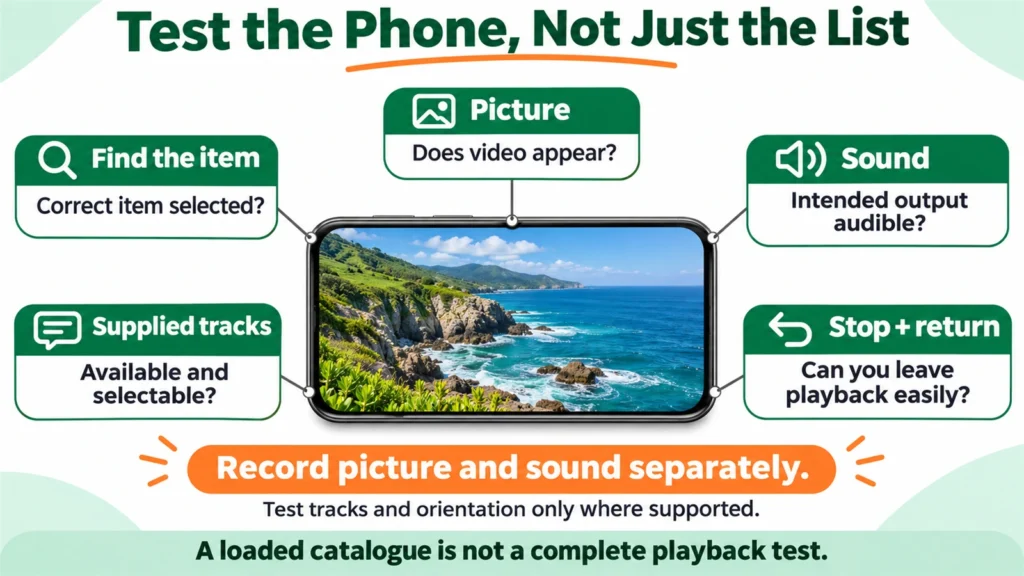
Test orientation controls only where supported. Observe whether the image and controls remain usable in your intended viewing position. Do not assume every item supports the same behaviour or that another app’s gesture applies here.
An unselected track and an absent track are different observations. If an audio or subtitle option is supplied and exposed through the supported player route, try the documented selection. If it is absent, note that fact; choosing another setting cannot create media that was not supplied.
Keep programme information separate too. EPG use needs relevant schedule data and channel mapping. An empty guide does not automatically invalidate a successful first video test, and completing how to watch IPTV on Android phone does not require fixing every optional guide function immediately.
Hypothetical example: the catalogue loads, but sound is missing
This example illustrates how to watch IPTV on Android phone without claiming a real device or customer test.
A viewer imports a supported playlist over Wi-Fi. The catalogue appears and one permitted item produces picture, but no sound. They record the app version, connection and item, then inspect the available audio track and phone output using the relevant documented controls.
Before changing the app, they note whether the intended output is the phone speaker or connected headphones. The check records a question to investigate; it does not invent a successful repair. They consult the audio troubleshooting guide while preserving that narrow observation. The example does not establish a successful repair or identify the app, phone or supplier as the cause. A loaded list and working picture remain different results from audible playback.
5. How to watch IPTV on Android phone: check mobile data
A working connection and sufficient data allowance are separate checks. Before moving to mobile viewing, confirm the intended network and the conditions of your plan. Do not assume a Wi-Fi symbol proves which connection carried an entire session.
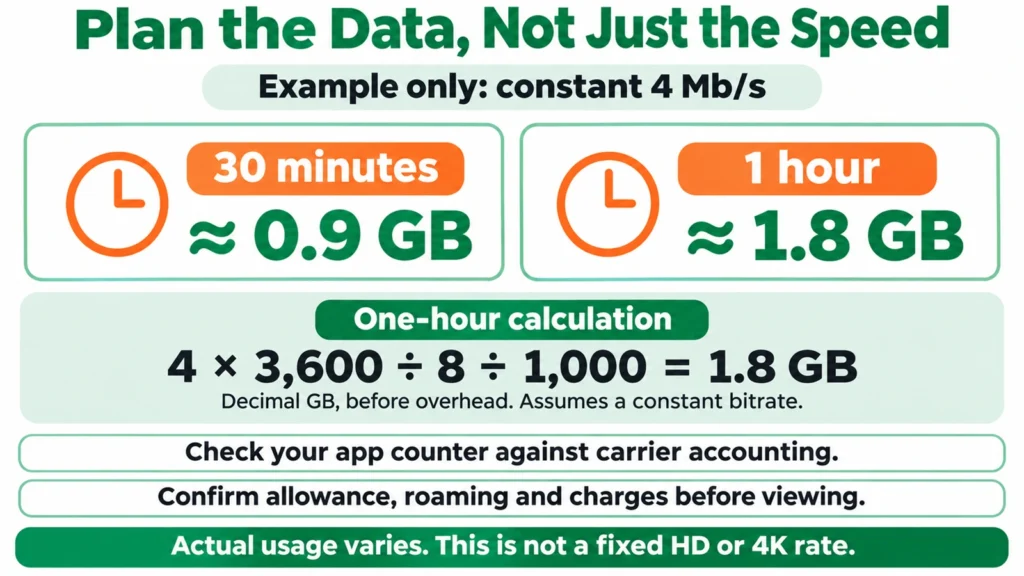
Data planning matters when learning how to watch IPTV on Android phone because a video session can consume a substantial allowance. Resolution labels alone do not establish consumption: bitrate, adaptation, viewing duration, retries and accounting affect the total.
Illustrative arithmetic — not a measured stream
Suppose a stream used a constant 4 megabits per second. Using decimal gigabytes, before overhead:
4 × 3,600 ÷ 8 ÷ 1,000 = approximately 1.8 GB per hour.
For 30 minutes, the same hypothetical rate gives approximately 0.9 GB.
This is arithmetic for an assumed constant bitrate, not a measurement, universal service requirement or promise about picture quality. Your actual stream and carrier accounting may differ. Do not treat it as an allowance that guarantees a particular session length.
For a Google Pixel example, Google’s mobile-data guidance describes Settings → Network & internet → SIMs → App data usage. Its warning/limit branch uses Data warning & limit. These are Pixel-labelled instructions, not universal Samsung, Xiaomi or Android menu paths.
When planning how to watch IPTV on Android phone within a data allowance, check the relevant period and app counter, then compare with your carrier’s allowance and billing information. Google distinguishes phone measurements from carrier accounting and notes manufacturer differences. Use your own device documentation where its menus differ.
Deciding how to watch IPTV on Android phone should include whether mobile viewing is appropriate at all. You do not need to incur paid data charges merely to complete a comparison. Stay on the permitted connection you intend to use unless a specific, affordable test is justified.
For capacity questions, the connection-speed guide provides further context. Available speed and a monthly data allowance answer different questions. Do not assume a Data Saver setting compresses the video itself or makes a plan unlimited.
Check roaming and charges against your actual plan before travelling. Knowing how to watch IPTV on Android phone at home does not establish the cost or permitted access conditions of another network or country.
6. Diagnose the first stage that fails
Describe the failure before changing settings. An unavailable installation, a rejected input and a stream without sound need different next checks. The purpose of troubleshooting how to watch IPTV on Android phone is to narrow the question, not rebuild every part at once.
| Observation | Useful next check | What it does not prove |
|---|---|---|
| Installation unavailable | Phone/account compatibility and verified developer source | Disabling protection is required |
| Input rejected | Supplied form and the app’s documented support | One definite account or supplier fault |
| Empty catalogue | Selected profile, input and documented retrieval/filter behaviour | Every stream is unavailable |
| List appears; media fails | One permitted playback request and exact error | Fresh access or working video was verified |
| Picture without sound | Available track and phone output checks | The whole service is down |
| Guide or track missing | Supplied metadata/media and supported handling | A paid upgrade will create it |
| Failure only on mobile data | Plan conditions, app data controls and permitted connection comparison | The operator has been identified as blocking it |
When checking how to watch IPTV on Android phone after a failure, change one condition at a time. Record the original result and any difference. A different network result is evidence about those conditions, not automatic proof of an operator restriction or service outage.
If playback starts and then pauses or freezes, use the extended buffering checks. That branch differs from media never starting. Another app working demonstrates some connectivity without validating every source request or account permission.
Preserve the phone model, Android version, app/version, input type and attempt time, including timezone where relevant. Stop repeated attempts if the app reports rate limits or lockouts, and use the supported recovery route.
Avoid resets, security downgrades or extra purchases as the first response. Before removing a working profile or any settings, retain a supported backup or recovery route securely. A useful guide to how to watch IPTV on Android phone should leave you able to recover the setup rather than erase evidence without a reason.
7. How to watch IPTV on Android phone: keep a usable setup
Keep a short record of how to watch IPTV on Android phone with your particular setup: app identity, supplied input type, tested connection and the action that succeeded or failed. Store credentials separately rather than including them in a general troubleshooting note.
Use this final six-point check:
- A compatible phone app is available from its verified source.
- The supplied input matches its documented workflow.
- Credentials and private access links remain protected.
- The test stays within current access and stream allowances.
- Picture, sound and the intended touch task have recorded results.
- Mobile data, connection choice and any charges are understood.
Before paying, write down the specific limitation, the function the offer promises to unlock and the account or platform it covers. Check whether payment is recurring and where it is managed. Only purchase a function you have confirmed you need after reading the current offer. Choosing an IPTV player for Android phone use is separate from paying for viewing access. Neither purchase should be used as a speculative diagnosis.
Ask app support about interface or build-specific behaviour and the supplier about supported input or current access. Provide a sanitised error, phone/app details, time and one controlled result. No passwords, complete private URLs or account tokens belong in a public report.
Your notes should explain how to watch IPTV on Android phone with the setup you actually have, while leaving optional features to their own checks. Background playback, casting, offline saving and recording should each be verified separately if you need them; they are not established by installing a player.
Frequently asked questions
What do I need to watch on an Android phone?
Learning how to watch IPTV on Android phone requires current authorised access, a compatible app and its supported input. Install, import and test one permitted item, then check phone controls and data conditions. The app alone does not supply viewing access.
Does downloading a player include channels?
No such access is established by installation. Obtain your own authorised source and confirm what it supplies. A player’s software purchase or Google account is separate from the content supplier’s credentials and entitlement.
Can I use an M3U file or URL?
Yes, where the selected phone app supports the supplied form. A local file and remote address need their appropriate import routes. Preserve the original resource and distinguish catalogue retrieval from successful media playback.
Where do Xtream credentials belong?
Use a separately verified compatible account-input workflow. The Sofronov listing used here does not establish that route. When checking how to play IPTV on Android phone, ask the supplier for a supported playlist form if your chosen app only documents playlists.
Can I watch using mobile data?
Only where your access conditions, phone/app settings and data plan permit it. Check allowance and charges before testing. Understanding how to watch IPTV on Android phone over Wi-Fi does not establish equivalent mobile cost or access.
How much data will a session use?
Actual consumption varies. The constant-4-Mbps illustration gives about 1.8 decimal GB/hour before overhead, not a measured service rate. When planning how to watch IPTV on Android phone, compare app counters with carrier accounting and your available allowance.
Why does the channel list load but the picture not play?
Catalogue data and media playback are separate results. Record the permitted item’s exact error and picture/sound outcome, then investigate that stage. A visible list alone does not establish a fresh successful account or stream request.
Does phone installation allow simultaneous TV viewing?
No. Check your simultaneous-stream allowance independently. Installing on another device does not add content connections. Stop other active playback before a sequential phone test where the account rules require it.
Your next step: how to watch IPTV on Android phone
Match your supplied input to a verified phone app, test one permitted item and record picture, sound and data conditions. If a stage remains unclear, use our setup help with a sanitised description. Keep how to watch IPTV on Android phone tied to your actual source and device rather than another purchase or a guessed workflow.