
TiviMate Premium vs Free: 7 Essential Checks Before You Buy
Decide whether a player upgrade fits your viewing needs. Check the current offer, separate app features from content access and avoid paying twice.

On this page
TiviMate Premium is a paid upgrade for player features; it does not supply channels or automatically repair a failed source. Decide by trying the player on a compatible device, naming a feature you need and confirming that the current offer includes it. Check the displayed price, renewal terms and purchase account before paying. Compare the free and paid options against your installed edition, with viewing content arranged separately.
A useful comparison starts with your household’s viewing task. Perhaps you want easier source organisation, recording or several pictures on one screen. First check what your current edition lets you do, then investigate the specific limitation you need to remove.
1. Is TiviMate free, and what does TiviMate Premium pay for?
Downloading a player, using its available basic functions and purchasing an upgrade are different steps. Inspect the current edition to see what is available without payment and what requires an entitlement. Do not assume a feature described on a general product page belongs to one tier or another.
The developer explains that TiviMate needs your own playlists. Paid upgrades concern the software; they do not supply channels. That distinction is central to deciding whether TiviMate Premium addresses your need.
If a feature asks for an upgrade, establish what the purchase unlocks before proceeding. A payment request is not evidence that the player will supply a channel account afterwards. Likewise, an account from your content supplier does not establish that paid app features are activated.
| Item | What it concerns | Relevant account or support | What it does not establish |
|---|---|---|---|
| Player installation | Obtaining the genuine application for a compatible device | Official developer/store route; device support where needed | Paid-feature entitlement or content access |
| Premium entitlement | Features included in the purchased software plan | Relevant purchase account and official app support | A channel subscription or extra viewing streams |
| Content/playlist account | Authorised access supplied separately for viewing | Your content supplier | A player upgrade or compatibility with every device |
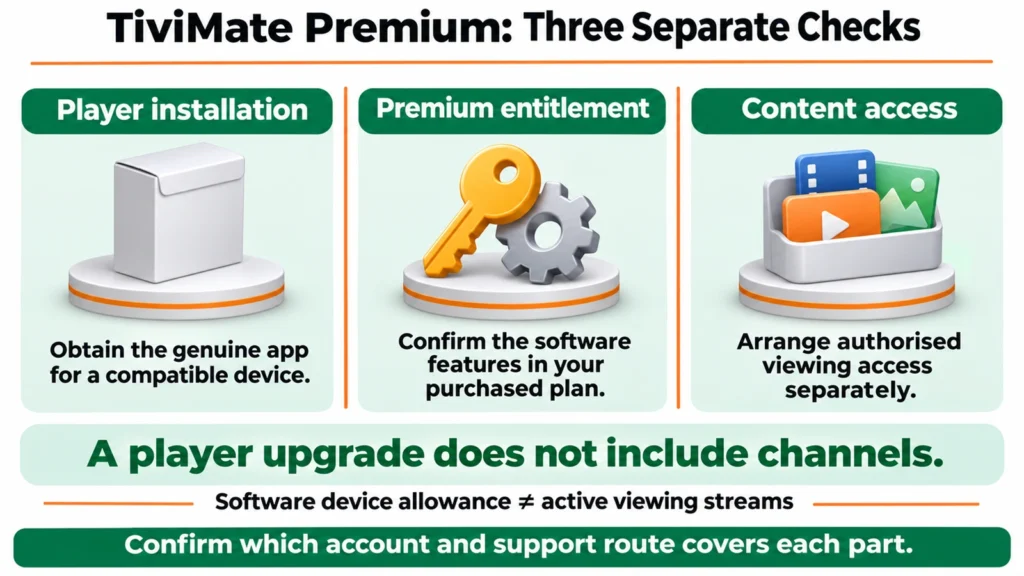
A supplier-provided viewing trial is also separate from a developer’s software trial. Check which product an offer covers and its actual conditions. Do not assume either trial exists for your account, lasts a particular number of days or unlocks every feature.
When asking “is TiviMate free?”, separate installation from the particular task you want to perform. The useful answer is what your edition allows now, what the upgrade would change and whether you need that change. There is no reason to buy solely because a paid option appears.
2. Confirm the right app and device for TiviMate Premium
The official TiviMate IPTV Player store listing identifies Armobsoft FZE and package ar.tvplayer.tv. It describes Android TV and remote-control navigation, without touch optimisation. That is a specific device orientation, not a promise of a native app on every television or phone.
Before choosing TiviMate Premium, record the device model, operating system, exact player and installed version. Check the current developer information for that combination. Samsung Tizen, LG webOS, Roku and Apple TV should not be treated as interchangeable with Android TV.
For Fire TV, verify the exact device and operating system against the current official installation source. Avoid assuming that instructions for an older model establish compatibility with every device carrying a similar name. Our Firestick setup guide provides wider setup context; the current player/device match still needs checking.
Companion has a different role. The official TiviMate Companion listing, package ar.tvplayer.companion, describes unlocking Premium on devices without Google Play and managing activated devices. It explicitly distinguishes Companion from the viewing player.
Finding Companion on a phone does not establish that you can watch through it, nor does it establish an iPhone player. Use the documented account-management function for the relevant route rather than expecting the two applications to do the same job.
Verify developer provenance before entering account information or paying. Similar names and polished promotional pages are not proof of an official connection. If your device is unsuitable, compare compatible IPTV players before evaluating an upgrade for software you cannot use as intended.
3. Compare TiviMate Premium features against your actual tasks
Write down the task first, then check whether your current edition already handles it. A useful comparison distinguishes an advertised capability from its inclusion in the plan offered to you. A general feature list is not a complete Free/Premium entitlement table.
The player listing advertises multiple playlists, programme-guide use, recording, multiview and catch-up. It does not establish a complete tier split. Treat the following as questions to verify, rather than confirmed Premium-only features.
| Your task | Capability to investigate | What the current plan must confirm | Other requirements |
|---|---|---|---|
| Organise several sources | Playlist management and navigation | Whether the exact function you need is included | Compatible supplied inputs and usable sources |
| Browse programme information | Guide display and navigation | Which desired guide controls are available | Relevant schedule data and channel mapping |
| Keep a programme for later | Recording | Whether your intended recording function is included | Accessible source, suitable storage/device and permitted use |
| Watch more than one picture | Multiview | Availability of the layout or function you need | Hardware capacity and sufficient content-stream allowance |
| Watch an earlier broadcast | Catch-up | Whether the supported replay function is included | Actual archive availability for the account and programme |
For recording, distinguish the software control from the complete capture arrangement. An unlocked feature is not enough if the intended source is inaccessible or the storage setup is unsuitable. Our recording requirements guide explains the wider checks without assuming that a player purchase supplies them.
Multiview can involve several content requests. Confirm how your supplier counts those requests and whether your device can handle your intended use. A licence entitlement is not permission to exceed content connections, and an impressive layout does not establish performance on your hardware.
Catch-up requires earlier material supplied through a supported route. TiviMate Premium cannot create missing past programmes. Confirm archive availability for the channels and programmes you want before making replay the reason for a software purchase.
Guide functionality also needs relevant schedule data. If a programme grid is empty, first establish whether schedule data exists and matches your channels. An app purchase is not evidence that the missing data will arrive.
Before committing to TiviMate Premium, define success in observable terms. For example, write down which recording task you need, which source it would use and where the result would be stored. That makes the purchase question more specific than simply wanting more features.
Choose one priority feature and verify both its plan inclusion and its dependencies. TiviMate Premium is worth considering when that specific unlock solves a real task on a suitable setup. If the current basic use already meets your needs, a longer feature list is not a reason to pay.
4. Check TiviMate Premium cost at the real point of purchase
Use the offer displayed to your account, not a price copied from a review or a converted amount from another country. A page displayed in British English does not establish a UK checkout price, and a search result can outlast the offer it describes.
The developer’s purchase terms describe one-time lifetime purchasing and recurring subscriptions, with available plans and prices shown at purchase. Confirm which options are actually offered through your route before comparing them.
For TiviMate Premium cost, record the complete displayed offer. Check the amount, currency, tax treatment shown, billing period, renewal information, device allowance and account. Keep a private record of the terms you are accepting, without exposing payment information.
Your TiviMate Premium cost worksheet
Use this worksheet privately. Leave each answer blank until you have inspected the actual offer; do not copy someone else’s prices or account details.
| Detail to check | Your displayed offer |
|---|---|
| Amount, currency and tax treatment shown | __________ |
| One-time payment or recurring billing period | __________ |
| Renewal date and renewal conditions, if applicable | __________ |
| Device allowance and activation conditions | __________ |
| Feature needed and confirmed plan inclusion | __________ |
| Purchase account and route | __________ |
| Official cancellation or purchase-support route | __________ |
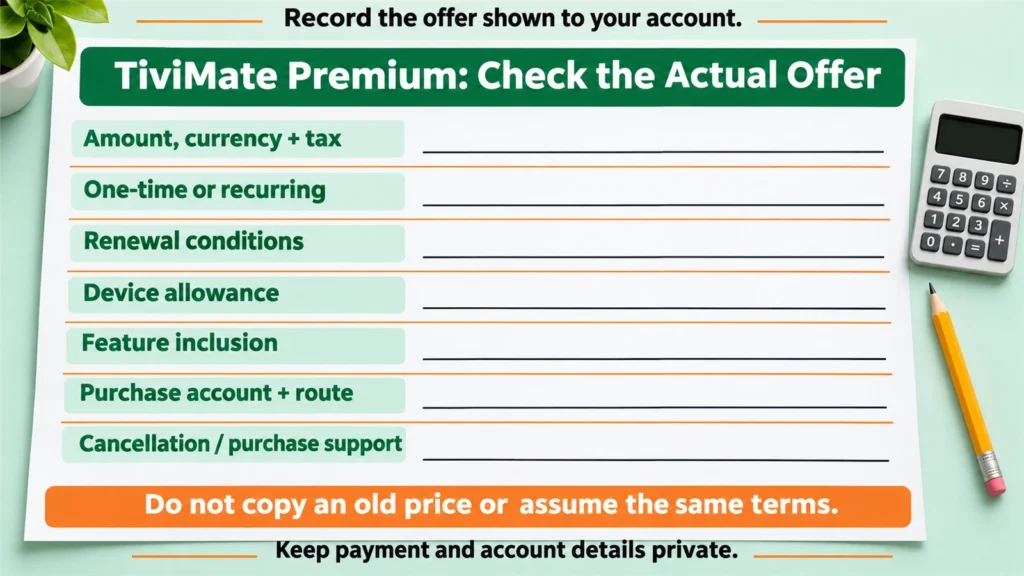
If both options are offered with comparable benefits, you can divide the one-time amount by the recurring annual amount to express the price as a simple number of annual payments. That comparison assumes the figures and billing periods you entered; future price changes and different plan benefits can change its usefulness.
Do not calculate an annual comparison from a monthly price without accounting for the actual period, and do not invent a break-even year from missing figures. The arithmetic is only one part of choosing a plan you expect to use.
Understand “lifetime” through the actual developer terms. It does not mean lifetime viewing content, and you should not infer guaranteed support for every future device, software version or update.
For recurring purchases, the terms distinguish cancellation from the period already paid for: stopping renewal does not shorten that paid period. Cancellation and refund handling depend on the purchase route and applicable terms; use the relevant official route rather than assuming the same process everywhere.
When comparing two TiviMate Premium offers, check whether their feature scope and device conditions match before comparing the amounts. A lower initial charge and a lower total payment are different questions. Keep the date of each displayed offer in your private notes.
If you cannot establish the full TiviMate Premium cost or renewal conditions, pause before confirming payment. Clarifying the offer is more useful than choosing an apparently cheaper plan whose scope is unclear.
5. Separate a TiviMate subscription from viewing connections
A TiviMate subscription concerns the software entitlement you purchase. A content subscription concerns the viewing access supplied separately. Keep their accounts, renewal conditions and support routes distinguishable in your records.
Check the device allowance in the actual TiviMate Premium offer. Do not assume a fixed number from an old tutorial or another person’s account. Establish how devices are counted and how an old activation can be removed through the supported account route.
Activated-device management is also different from synchronisation. Do not assume that adding a device automatically copies favourites, transfers recordings or restores every setting. Ask about the exact behaviour you need rather than interpreting an account dashboard as a backup system.
Software device slots do not expand your supplier’s simultaneous-stream allowance. A recording or multiview session may also count towards that allowance according to the service’s rules. Confirm those conditions before relying on several active requests.
Illustrative household example: two televisions, one active stream
This is a hypothetical example, not a customer story or a TiviMate product test.
A household wants paid player features on two televisions. For this example, suppose the selected software offer permits both activations, while the separately supplied content account permits one active stream.
Activating TiviMate Premium on both televisions would establish software entitlement under that offer. It would not establish permission for both to play content simultaneously. The household would still need to follow the supplier’s one-stream rule.
The useful next question is which television will be active and whether the intended recording or multiview use changes the number of requests. Another app activation is not the answer to a content-connection limit.
This example supplies no real device quota or pricing. Its purpose is to show why two different allowances need two different checks before the household buys or starts playback.
6. Buy and activate TiviMate Premium through the verified route
Proceed only after confirming the device, desired feature and current offer. TiviMate Premium activation should follow the developer’s supported process for your particular purchase route. There is no universal sequence of buttons to apply to every installation.
Use this conditional checklist:
- Confirm the exact player and genuine developer or store provenance.
- Inspect the plan currently offered, including its feature scope and purchase terms.
- Identify the TiviMate account associated with that purchase.
- Follow the purchase or unlock procedure documented for the device and route.
- Confirm entitlement through the supported flow using the relevant account.
- Add content access separately through the appropriate supported input.
- Test the specific feature you bought within device and source allowances.
Companion’s documented purpose does not make it a universal requirement for every purchase. Likewise, terms mentioning different purchase routes do not establish that every reader will see identical checkout options.
Keep app entitlement separate from content login. Your purchase account identifies the software entitlement; a supplier’s server details or playlist establish a different connection. Our Xtream Codes login guide explains that content-input distinction without turning a player payment into a viewing account.
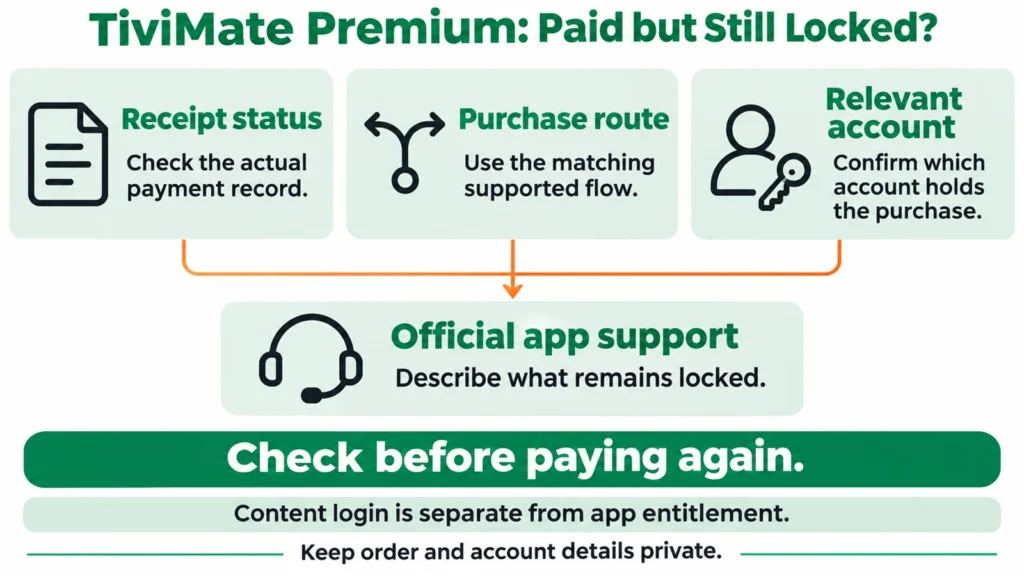
For a TiviMate Premium feature test, record what you selected, whether the intended control became available and what happened next. If the control appears but the source fails, keep those outcomes separate when describing the result to support.
If TiviMate Premium appears paid for but unavailable, check the receipt status, purchase route and actual account before paying again. A payment notification alone is not a reason to create another account or repeat the purchase.
For a TiviMate Premium entitlement problem, contact official app support with the device, exact app version, purchase route and a clear description of what remains locked. Share order information only through the appropriate private route. Redact account identifiers, payment details and unrelated personal information from screenshots.
Do not begin by deleting app data, reinstalling or resetting the device. Preserve recovery information before any supported action that removes settings. The first question is whether the confirmed purchase is associated with the account and flow you are using, not whether another payment will make it appear.
7. Decide whether TiviMate Premium solves your problem
Bring the decision back to the task you identified at the start. A software upgrade can be useful when its verified entitlement removes a real limitation. It is not a diagnosis for every viewing problem.
| Your situation | Sensible next action |
|---|---|
| Current basic use already meets the need | Continue using it; reassess if a specific limitation matters later |
| A desired unlock is confirmed and the setup supports it | Compare the actual offer and purchase conditions before deciding |
| Content access fails | Investigate the source/account or playback stage before buying software features |
| The intended device is unsupported | Choose a compatible setup before paying for an upgrade |
| A purchase exists but entitlement is unclear | Check the account and receipt, then contact official app support |
TiviMate Premium does not renew an expired playlist, supply an unavailable archive or prove that a source is reachable. If content starts and then stalls, follow the buffering checks rather than assuming payment will improve the connection.
Keep the support question specific. App purchase and activation problems belong with official app support; viewing-account access and expected source availability belong with the supplier. Those are starting points for clarification, not proof of fault.
IPTV Ireland Fast’s setup guides can help organise the content-setup checks. This is an independent guide to evaluating the player, not a TiviMate checkout or developer support service. Do not assume a content plan bundles a software licence unless that arrangement is explicitly confirmed.
Keep a short note of the installed version, the offer inspected and the feature inclusion you confirmed. If a description is ambiguous, ask about the exact task before paying. For example, “Does this offer include the recording control on my device?” is more useful than asking whether everything is unlocked.
A useful TiviMate Premium decision ends with a named benefit and an offer you understand. If either is missing, clarify it before buying.
Frequently asked questions
Is TiviMate free?
Check the current edition for available basic use and any paid restrictions. Installing the player is separate from purchasing features and obtaining content. Do not assume a permanent free feature set or a particular developer-trial duration from an older guide.
Does TiviMate Premium include channels?
No. TiviMate Premium concerns player features, while viewing content must be supplied separately through your authorised access. A software payment does not establish an active playlist account or guarantee any channel’s availability.
How much does TiviMate Premium cost in the UK?
Check the amount, currency, tax display and billing conditions shown at your actual point of purchase. Use the offer displayed to your purchase account. A store language setting or another country’s price is insufficient evidence of what your account will be charged.
Is a TiviMate subscription the same as an IPTV subscription?
No. The software purchase and content access serve different functions. Confirm which account covers each, along with its renewal terms and support route. Paying for one does not automatically establish that the other is active.
What is Companion for?
Its developer description concerns Premium unlocking on devices without Google Play and managing activated devices. Companion is not the viewing player. Use its documented role where relevant rather than assuming everyone must purchase through it.
Does paying cover more simultaneous streams?
Do not assume so. The software offer’s device allowance is separate from the content supplier’s active-stream allowance. Verify both before planning simultaneous viewing, recording or multiview use.
Can Premium solve buffering?
A TiviMate Premium purchase is not a guaranteed buffering fix. Identify the playback conditions and source behaviour first. Confirming a useful app feature is different from diagnosing why a stream stalls.
What should I check if payment has not unlocked TiviMate Premium?
Verify the receipt status, purchase route, relevant account and supported entitlement flow. Keep details private and contact official app support before paying again. Preserve settings before any disruptive troubleshooting action.
Before you decide on TiviMate Premium
Before buying TiviMate Premium, check these five essentials:
- Device: the exact player edition supports the hardware and operating system you will use.
- Feature: you can name the task and have confirmed the relevant unlock in the current offer.
- Cost: you understand the displayed amount, currency, billing period and renewal conditions.
- Purchase account: you know which account holds the entitlement and where its receipt is stored.
- Content: viewing access is arranged separately, with an allowance suitable for your intended use.
If these checks support your intended use, compare the options offered and decide. If one is unclear, ask the relevant supplier or developer before paying. You can return to the decision later without making another purchase now.