
How to Choose the Best IPTV App for Your Device
Choose an IPTV player that fits your device, remote control and viewing needs. Learn what to check before installing an app or paying for premium features.
On this page
The best IPTV app runs on your exact device, accepts your authorised service’s input format and makes everyday viewing comfortable. Check those basics before comparing premium features. A paid player unlock does not automatically include channels, and a familiar app name does not guarantee compatibility with your television or phone.
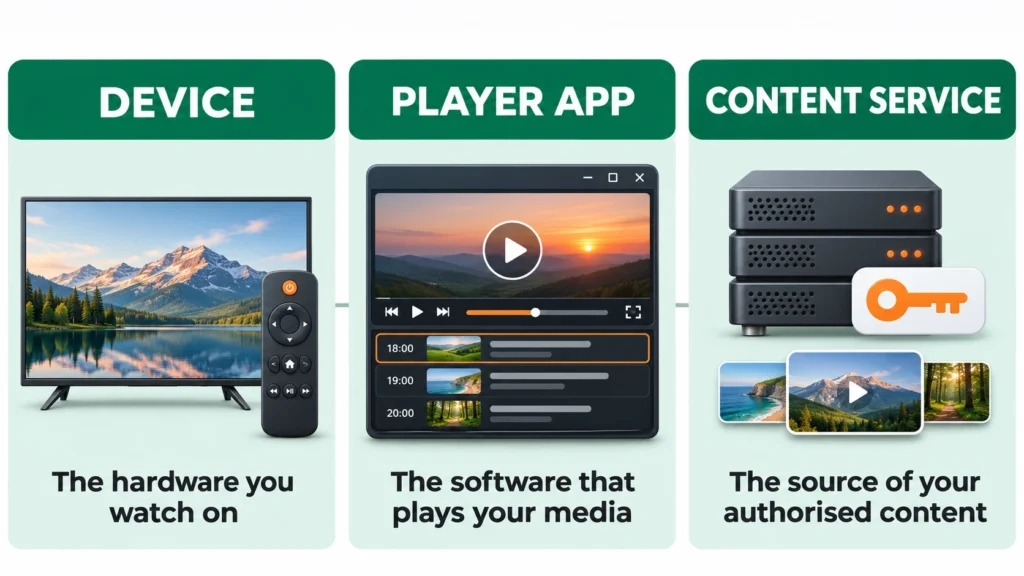
Device, IPTV player app and content service: three separate parts
Your device is the hardware: a television, streaming box, phone, tablet or computer. The player is software that opens and presents supported media. The content service supplies authorised access to the programmes or streams you intend to watch.
Those parts can have separate accounts, costs and support teams. Installing a player does not activate a content subscription. Paying your content provider does not necessarily unlock a player’s premium features. Even the best IPTV app cannot create account access that your provider has not supplied.
Before browsing app lists, write down your device model, operating system and the setup method your provider supports. Then identify what you need during ordinary viewing: a readable guide, straightforward remote navigation, particular subtitle options or comfortable touch controls. That short list gives you a reason to choose rather than a collection of features to buy.
1. Match the best IPTV app to your exact device
Choosing an IPTV app for Smart TV
Identify the television platform before comparing features.
For an Apple TV hardware box, our Apple TV player-selection guide separates tv OS compatibility, supplied input and remote-control tasks.
A television brand is not a complete compatibility description. Samsung Tizen, LG webOS and Android TV/Google TV are different platforms. An Android phone and an Android TV device also require separate checks; a phone listing does not establish that a remote-friendly television version is available.
For platform-specific checks, use our Samsung TV player guide or LG TV player guide.
Choosing an IPTV app for Android
Specify whether you mean a phone, tablet or television build. Check the developer’s support information for that form factor, not just the word Android in a search result.
For touchscreen use, follow our Android phone setup checks to match the supplied input, test picture and sound, and review mobile-data use.
Find the model and operating-system information using the manufacturer’s documentation. Compare those details with the actual developer’s listing, including supported devices and regional availability. For readers in Ireland, check the Irish storefront associated with the device account rather than relying on an overseas search result.
For a Fire TV Stick, use the Fire TV Stick setup checks to distinguish platform compatibility from app availability.
The best IPTV app for your television must be installable through a trustworthy route and usable with its normal controls. A promising screenshot is insufficient if the listing does not support your model.
Our device compatibility guide provides broader setup context. Still verify the individual app: a device’s ability to stream does not establish compatibility with every player. Keep an existing working installation while investigating alternatives; choosing the best IPTV app does not always require replacing it.
For tablet viewing, our iPad player-selection guide covers touch navigation, layout and supported multitasking.
2. Check the installation source, developer and update support
Start with the developer’s genuine website and follow its linked distribution routes. Compare the developer identity, app title and platform with the listing you are considering. Similar names, familiar colours and copied logos do not establish that two downloads are the same product.
When comparing the best IPTV app options, look for usable documentation, a clear support route and information about supported systems. Check whether the installed version can receive official updates. A recent update is useful context, but neither an update date nor a high review score guarantees reliability.
Avoid random APK mirrors, installation codes from anonymous comments and downloads presented as universal replacements. If the supported installation route is unclear, ask the developer before entering private access details.
Your shortlist for the best IPTV app should identify an exact product, developer and platform. Save the genuine listing address so you can find support again. Do not assume instructions for a similarly named legacy player apply to the current installation.
3. Confirm the input format your service supports
Ask your provider one practical question: “Which setup method do you support for this exact app and device?” Include the app title, developer, device model and operating system, not your password. A clear answer can prevent paying for a player that cannot accept the supplied access.
An M3U playlist link gives a compatible player a list of media entries and their locations. Provider-supported login methods can instead use supplied account and server information. An EPG source provides programme-guide data; it is not itself a channel subscription. Support for each method depends on the app and version.
The best IPTV app for your account is one whose documented inputs match the provider’s supported setup. Do not assume every player accepts every login, playlist format or MAC-based arrangement.
Distinguish an app-store account, a player-premium account and a content-service login. Preserve the protocol, port and path your provider specifies rather than guessing a replacement address. Even the best IPTV app cannot resolve a mismatch by using credentials intended for a different account or unsupported workflow.
4. Try remote navigation and everyday controls
Everyday tasks for an IPTV player app
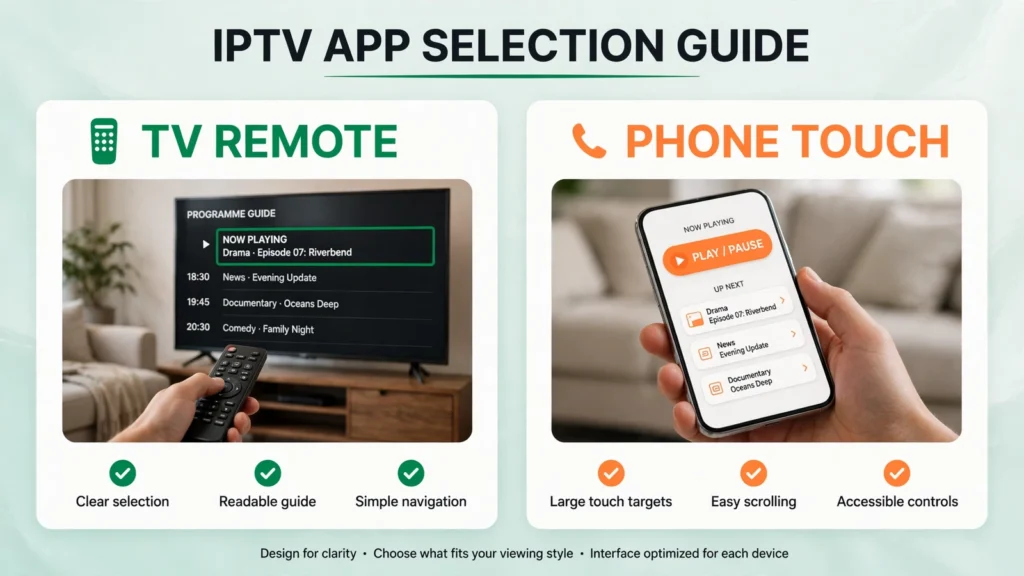
An IPTV player app should make ordinary tasks easy: finding a programme, selecting a favourite, returning to the guide and recovering from an accidental button press. On a television, try these tasks with the actual remote from your usual seat.
Check whether the selected row is obvious, text is readable and the back button behaves predictably. Try search, favourites and channel switching where available. If resuming supported content matters, test what happens after leaving and reopening it; do not infer behaviour from a feature label.
In a hypothetical living room, one viewer can read the guide comfortably but cannot tell which row the remote has selected. That player may have many features, yet it is a poor everyday fit for that viewer. The best IPTV app makes the next action clear.
Try a specific routine: open the guide, find one programme, add a favourite and return to playback. If a household member uses assistive technology, repeat that routine with their usual controls. A feature name in a listing is less useful than confirming that the person can complete the task.
A phone interface can prioritise touch gestures and compact controls. Those choices may be awkward with directional buttons. When choosing the best IPTV app, judge the interaction you will actually use rather than the most attractive promotional screenshot.
5. Check EPG and catch-up requirements
An electronic programme guide, or EPG, displays programme information when usable data is available and correctly associated with the content. An app can support a guide while a particular source supplies incomplete, outdated or mismatched listings.
For the best IPTV app comparison, ask whether your provider supplies guide data, whether the player accepts it and whether entries correspond to the streams you use. During a permitted test, compare a few listings with the provider’s expected schedule. A blank guide needs investigation; it does not automatically mean the player is unsuitable.
Catch-up is separate. It requires access to supported past programmes through the provider or source, together with compatible player handling. A catch-up button does not establish that every programme is retained or available to your account.
Choose the best IPTV app based on the complete arrangement, including source support. Paying to unlock a guide or catch-up function cannot manufacture missing programme data or unavailable past broadcasts. If those features matter, confirm the provider’s conditions before paying for the player.
6. Test subtitles, audio and playback compatibility
Use content you are authorised to access on the device you intend to watch. Test whether playback starts, remains usable and offers the subtitle or audio selections you need. Available tracks depend on the source and the player’s handling of them.
The best IPTV app for someone who relies on subtitles must make supported tracks easy to find and read. Check text size and contrast where adjustment is offered. If a track is absent, ask whether the source includes it; enabling a setting cannot create missing subtitles or another language. Some players can also load a separate authorised subtitle file, but that is a different workflow to verify for the particular app and device.
Technical terms also need context. A codec is the method used to encode and decode media. Successful playback depends on the source format, app and device combination. Do not read a general 4K or HDR claim as a guarantee for every stream, display or connection. Verify casting separately if you need it.
Switching to the best IPTV app for your controls will not automatically repair source interruptions or network trouble. Use our buffering diagnosis guide when interruptions, rather than navigation or format support, are the main issue.
7. Compare free features, paid features and renewal terms
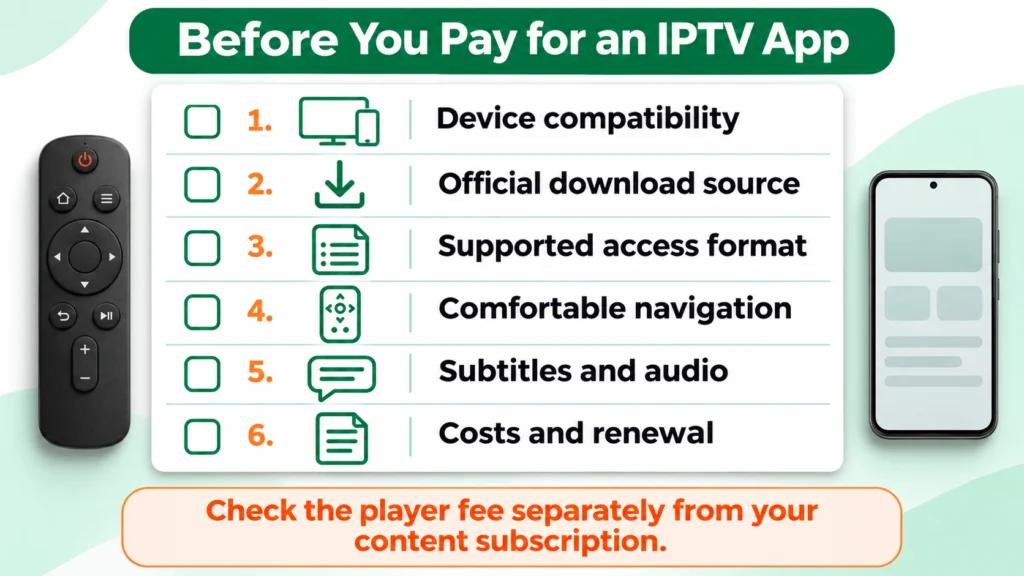
List the features you actually need, then establish which are included without payment and which require an unlock. A free tier may be sufficient; a paid tier may be worthwhile when it provides a verified function you will use. Price alone does not identify the best IPTV app.
Before checkout, check:
- The seller and exact product being purchased.
- The displayed currency and total charge.
- Whether payment is one-off or recurring.
- The billing period and renewal conditions.
- The player licence’s device allowance.
- How purchases are restored, managed or cancelled.
Keep the player fee separate from your content subscription. A licence covering several app installations does not necessarily permit several simultaneous streams from your provider. These are different allowances governed by different sellers.
For the best IPTV app decision, compare the total arrangement you will use rather than an isolated headline price. Confirm uncertain terms at checkout and retain the purchase details privately. Record which seller handles the payment and where the renewal can be managed. Do not apply your content service’s renewal rules to an unrelated app-store purchase.
8. Review privacy, permissions and household controls
A private playlist URL may contain information that grants account access. Treat it with the same care as a password. Do not paste it into public compatibility checkers, screenshots, review comments or online discussions.
Before trusting an IPTV player app, read the developer’s privacy information and consider whether requested permissions fit the documented function. Ask about an unexplained request instead of granting access simply to get past a prompt. Store availability helps establish a distribution route; it does not prove that separately supplied content is licensed or eliminate every risk.
The best IPTV app for a shared household may also need effective restrictions. Where parental controls are offered, check what they protect: selected content, settings, purchases or something else. Do not assume an advertised PIN covers every screen.
Keep account details out of shared notes and redact them when seeking help. Choosing the best IPTV app includes checking whether you can obtain useful support without exposing private access. Describe the device, failure stage and redacted message rather than publishing credentials.
9. Test the best IPTV app before committing
Use a permitted free tier, demonstration or trial where available; do not assume every developer offers one. Keep the test focused on your essential tasks. Close existing playback sessions and respect the content service’s connection allowance throughout.
Follow this checklist:
- Install the verified app for the intended device and store region.
- Enter access using the provider-supported method.
- Confirm that the expected authorised library loads.
- Load the guide, if supplied, and inspect several entries.
- Navigate search, favourites and back controls with the intended remote or touch interface.
- Play authorised sample content, one stream at a time unless more are permitted.
- Select available subtitle and audio tracks that matter to you.
- Close and reopen the app, then repeat an everyday task.
- Note errors, missing essentials and the app/device versions involved.
The best IPTV app should pass your essential checks without relying on features that remain unverified. Use a simple decision record for the best IPTV app shortlist: essential task, observed result and unresolved question. Mark a requirement as unverified if the free tier does not let you test it; do not assume payment will solve it.
A short successful test cannot guarantee future performance, but it can reveal an unsupported input, unreadable interface or missing control before payment. If problems arise, change one variable at a time and preserve working access.
A practical decision table for your shortlist
Use this table to narrow the best IPTV app candidates to those that fit your main viewing situation. Treat each row as something to verify, not a promise about a named product.
| Device or use case | What to prioritise | What to verify |
|---|---|---|
| Television operated by remote | Clear selection highlight, readable guide, predictable back button | Remote-friendly build, exact device support and comfortable viewing distance |
| Built-in Smart TV player | Support for the television’s actual operating system | Model, Tizen/webOS or other platform, developer identity and Irish availability |
| Phone or tablet | Touch controls, readable menus and convenient track selection | Mobile-specific support, input method and behaviour on the actual screen |
| Computer | Comfortable keyboard/mouse controls and required media support | Operating system, supported inputs and whether a full guide is needed |
| Accessibility needs | Readable text, clear focus, usable subtitles and assistive controls | The particular accessibility functions on the installed app/device combination |
An IPTV app for Smart TV needs a more precise description than “works on televisions”. Record the platform and model when asking for recommendations. Likewise, an IPTV app for Android should be identified as a phone, tablet or television build before you compare controls.
Examples, not a universal ranking
These examples illustrate different approaches using developer materials. They are not hands-on reviews or comparative performance scores. The best IPTV app depends on the fit established by your own checks.
TiviMate: an Android TV-focused example
The official TiviMate site describes the player as intended for Android TV devices and not optimised for phones or tablets. It advertises functions including favourites, search and catch-up. Its terms distinguish application purchases from content: users add their own playlists, and premium access does not supply channels.
Before purchasing an upgrade, use our TiviMate Premium versus free checklist to review the feature you need, purchase scope and current renewal terms.
Those facts make it a relevant candidate to investigate for remote-based viewing, not automatically the best IPTV app for every television. Verify the applicable tier, device and source requirements before relying on a particular feature.
Smarters Pro: verify the exact product first
The Smarters Pro terms identify TECH SMARTERS Pvt Ltd and describe a standalone player without supplied content. The developer’s pages distinguish television and mobile distribution routes.
Do not merge that product with every legacy or similarly named Smarters app. To assess whether it is the best IPTV app for your situation, establish the actual developer, supported input and device-specific listing. If you already use one and encounter access or launch trouble, our Smarters troubleshooting guide covers that separate decision.
VLC for Android: a general media-player example
VideoLAN’s Android documentation describes network-stream playback. Its official Android feature page also documents subtitle support and selection among available audio or subtitle tracks.
That makes VLC relevant when investigating supported media playback. It does not establish a complete provider-login workflow or television-guide experience equivalent to a dedicated player. The best IPTV app choice therefore depends on whether you need general playback or a broader viewing interface; verify the required workflow rather than assuming equivalence.
A hypothetical household: one service, different priorities
Imagine two adults choosing players for different devices. One watches on an Android TV device from a sofa and needs an obvious focus highlight, favourites and readable guide text. The other watches on a phone and values large touch targets and straightforward subtitle selection.
They could reasonably choose differently. An IPTV app for Smart TV that feels comfortable with directional buttons may be awkward on a small touchscreen. An IPTV app for Android phones may offer touch controls without providing the television experience the first viewer needs.
Their best IPTV app choices would follow verified compatibility and daily use, not a universal winner. They would also check whether their provider permits both devices to stream together before overlapping sessions. The scenario illustrates a decision method; it does not report testing of a named app.
Frequently asked questions
Are channels included when I install a player?
Not automatically. A player opens supported media; your authorised content source supplies access. Check what the seller actually provides. The named standalone players discussed here should not be treated as channel subscriptions simply because they display a library or offer premium features.
Is a paid app necessary?
No. The best IPTV app for your needs may offer everything essential without a paid upgrade. Pay only when a documented premium feature solves a requirement you have verified. A fee does not guarantee better streams, broader rights or compatibility with an unsupported account.
Can the same player run on every Smart TV?
No universal compatibility should be assumed. Check the operating system, model, developer listing and region. Even when a product name appears on several platforms, features and controls may differ. A television brand or a phone-store listing is not enough to confirm support.
Can changing player fix buffering?
Sometimes a comparison helps investigate app-specific handling, but changing players does not automatically fix a source or connection problem. Keep the device, stream and network unchanged where practical. For capacity questions, use the broadband-speed guide rather than assuming a premium app increases available bandwidth.
Does premium unlock more service connections?
Not necessarily. A player licence’s device allowance and your provider’s simultaneous-stream limit are separate. Ask both sellers when the distinction is unclear. The best IPTV app cannot grant extra provider sessions merely because its own premium licence supports additional installations.
What if subtitles are missing?
Check whether the particular source includes subtitles and whether your app/device combination supports selecting them. Try another authorised item known to include tracks, if available. A subtitle switch cannot create missing source data, and successful subtitles on one item do not establish support for every format.
How should I check availability in Ireland?
Follow the genuine developer’s listing to the storefront used by your Irish account. Verify the exact device and operating system, then check the displayed currency and purchase conditions. An overseas listing or an installation on somebody else’s device does not establish eligibility for yours.
Your next step
Write down your device, supported access method and three essential viewing tasks. Use those details to identify the best IPTV app for your circumstances, including an existing player that already meets them. Consult the setup guidance if you need help matching the device and access method before paying for optional features.